We are the most popular brand for Giveaways, WordPress Plugins & WordPress Themes.
Request Themes & Plugins or Get New Updates
Can’t find your favorite WordPress item? Submit a request above, and we’ll add it to our repository!
Important: Extract Before Uploading
After downloading a file from our website, unzip it first. The main zip file may contain additional folders like templates, documentation, or other resources. Ensure you upload the correct file to avoid errors.
How to Install Plugins
How to Install Themes
Request Themes & Plugins or Get New Updates
Can’t find your favorite WordPress item? Submit a request, and we’ll add it to our repository!

Buy Latest Version & Future updates
$15.00
$4.99
Join Our Membership to Access All Products
Download this and 12000+ Plugins & Themes as a premium member for only $7.99.
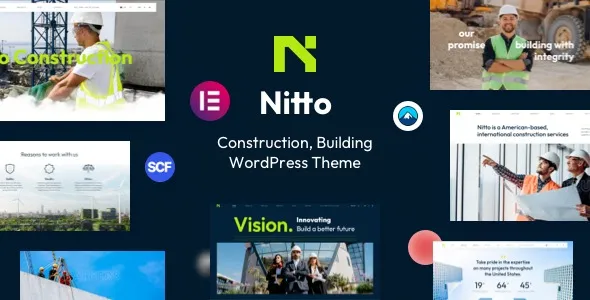
Nitto Building Construction WordPress Theme is built for companies that need to show credibility fast. Think construction firms, contractors, architects, renovation crews, engineering consultancies, and building suppliers. The theme’s real job is to give you a structured way to present services, project galleries, team profiles, and contact paths without having to design every page from scratch.
Where people get disappointed is expecting it to behave like a project management system or a quoting tool. Nitto can help you present projects and capture leads, but it will not replace a CRM, estimating software, or a complex tender workflow. When you treat it as a publishing layer for a construction brand, it makes sense.
I have seen teams buy a “construction theme” and then spend two weeks fighting the demo because they tried to bend it into a marketplace or a membership portal. Nitto is happiest when the site is service-led and portfolio-supported.
With a clean install and one focused goal, you can usually get a usable site live in days, not weeks. The key is to decide early whether your homepage is about services (most construction companies) or proof (project portfolio first). Nitto’s layouts tend to reward a clear hierarchy.
Typical outcomes we’ve shipped using themes in this category:
Service pages that convert. One page per service with a tight scope, before/after visuals, and a simple CTA. These pages are where organic traffic lands.
Project case studies that are easy to scan. Not just a gallery. A short brief, constraints, materials, timeline, and a few images. This is where trust is built.
Local SEO support pages. If you operate across multiple areas, you can add location pages without making the site feel like a directory.
The most common slowdown is demo import expectations. People assume the demo is a “one click and done” website. In reality, demo content is scaffolding. It gets you the blocks, typography, and section structure, but you still need to replace images, rewrite headings, and re-map menus.
Another frequent issue is media bloat. Construction sites love high-resolution photos. If you upload 8–12MB images straight from a phone, you can make the site feel slow even on good hosting. The theme will not save you from unoptimized assets.
We also run into “page builder lock-in” anxiety. If Nitto relies on a builder (common in this niche), the layout editing experience is fast, but you should accept that switching themes later will require cleanup. That is not unique to Nitto, but it matters when planning a long-term site.
A generic business theme can look clean, but it rarely gives you construction-ready patterns out of the box. Nitto’s value is in the assumptions it makes: services, projects, trust elements, and clear contact paths. That saves time because you are not inventing structure.
Where it tends to outperform “multipurpose everything” themes is consistency. Construction brands typically need bold headings, strong visual sections, and straightforward navigation. Overly flexible themes invite too many design decisions, and teams end up with five different button styles and three different page structures.
If you already have a strong design system and a developer building custom templates, you may not need a niche theme. But if you want a site that looks credible quickly and stays organized as you add projects, Nitto is the kind of theme that reduces decision fatigue.
Theme performance is rarely the only factor, but it is the foundation. The biggest wins I’ve seen with Nitto-style builds come from controlling what loads on every page.
Practical steps that usually help:
Be selective with sliders and animations. They can look good on a demo, but they often add weight and distract from project imagery.
Standardize image sizes. Pick a few image aspect ratios for projects and stick to them. It reduces layout shifts and avoids awkward cropping.
Audit plugins early. A construction theme site often ends up with forms, SEO, caching, and maybe a gallery plugin. Add too many “nice to have” plugins and you will feel it on mobile.
On a live site, we fixed a stubborn slow homepage by removing a background video section and replacing it with a compressed hero image plus a short trust statement. The bounce rate dropped, and the page became easier to crawl because it rendered faster.
If you are searching for “Nitto Building Construction WordPress Theme download”, treat the process like any other production change. The theme is simple to install, but the mistakes happen around overwriting settings and importing demo content on a live site.
Clone your site or create a staging environment. If you do not have staging, use a fresh WordPress install on a subdomain. We do this even for “just a theme” because demo imports can alter menus, widgets, and homepage settings.
Before installing, confirm your WordPress version is current and your PHP version is supported by your hosting. Many theme issues that look like “broken layout” are actually outdated PHP or memory limits.
In WordPress, go to Appearance > Themes > Add New > Upload Theme. Upload the theme ZIP and activate it. If the upload fails due to file size limits, use FTP or your host file manager to upload the theme folder to /wp-content/themes/.
After activation, you may be prompted to install recommended or required plugins. Install the essentials first. Avoid installing every optional plugin until you know you need it. This keeps troubleshooting clean.
If you import a demo, do it on staging. After import, check menus, homepage assignment, and permalink settings. Then replace demo images and text rather than editing around them. It is faster and avoids leaving placeholder content indexed.
When you go live, re-check navigation, contact forms, and core pages. Then run a quick crawl or at least spot-check that key pages return 200 status codes and that no demo URLs are exposed.
Most teams waste time tweaking colors before they fix site structure. With Nitto, I recommend setting the information architecture first: Services, Projects, About, Areas Served, Contact. Once that is stable, design tweaks become meaningful instead of cosmetic.
Customizations that consistently improve results:
Rewrite section headings to match how clients search. “Our Services” is fine, but service pages should use specific terms like “Commercial Fit-Outs” or “Home Extensions” if that is what you do.
Turn projects into proof, not a gallery. Add a short scope statement, constraints, and outcomes. Even two sentences helps Google and users understand the work.
Make contact options obvious. On mobile, a sticky call button or a clear “Request a site visit” CTA often converts better than a generic contact form.
Add trust elements in the right places. Certifications, insurance, and safety statements belong near service CTAs, not buried on an About page.
Yes. In fact, it can be easier because you can focus on 3–5 strong case studies and a clear services list. The theme structure helps you avoid a thin, one-page site that feels incomplete.
Demo imports typically add content and may change homepage, menus, and widgets. That is why we import on staging first. If you must test on a live site, take a full backup and document current menu and homepage settings.
Most of the “demo look” comes from sample content, builder templates, and plugin settings. After activation, install the required plugins and assign the correct homepage. Also check that your permalinks are set to “Post name” to avoid odd URL behavior.
Many construction themes are designed around a builder experience. If Nitto ships with builder-based templates, you can still publish basic pages in the WordPress editor, but you may not get the same layout controls as the demo.
Create a staging site, confirm PHP and memory limits, and list the plugins you truly need. That prep prevents the most common failure mode: installing everything at once and not knowing what caused the conflict.
It can, as long as you avoid thin location pages. Use location pages to add real proof, such as projects completed in that area, travel radius, and service constraints. Otherwise you risk creating duplicate-intent pages that do not perform.
Geotoko is a trusted GPL website for WordPress themes, plugins, Shopify templates, and free giveaways. Download original, secure GPL files with lifetime updates.
All products on Geotoko are fully licensed under the GNU General Public License (GPL) and are independently reviewed for safety and quality.