We are the most popular brand for Giveaways, WordPress Plugins & WordPress Themes.
Request Themes & Plugins or Get New Updates
Can’t find your favorite WordPress item? Submit a request above, and we’ll add it to our repository!
Important: Extract Before Uploading
After downloading a file from our website, unzip it first. The main zip file may contain additional folders like templates, documentation, or other resources. Ensure you upload the correct file to avoid errors.
How to Install Plugins
How to Install Themes
Request Themes & Plugins or Get New Updates
Can’t find your favorite WordPress item? Submit a request, and we’ll add it to our repository!

Buy Latest Version & Future updates
$10.00
$2.99
Join Our Membership to Access All Products
Download this and 12000+ Plugins & Themes as a premium member for only $7.99.
Most fitness sites begin the same way: a generic theme, a couple of landing pages, and a timetable image uploaded as a workaround. It looks fine until you need to update classes weekly, add trainer profiles that actually convert, or stop losing leads because the booking button is buried below the fold.
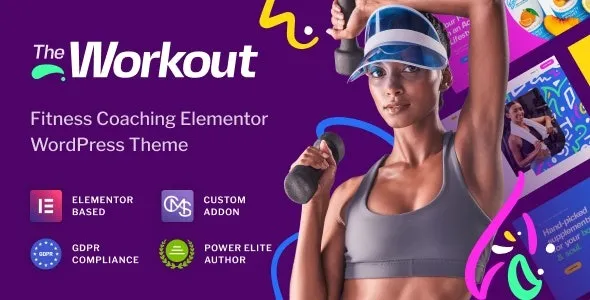
The Workout Trainer Fitness WordPress Theme is built around that reality. It gives you fitness-first page patterns (trainers, schedules, classes, pricing, transformations) so you are not inventing a gym website from scratch every time.
Used well, this theme lets you publish a structured fitness site quickly: homepage sections that speak to a specific program, trainer pages that feel consistent, and class or service pages that don’t require custom templates.
What it does not magically do is run your business logic. If you need real-time class capacity, member portals, or complex recurring bookings, you will still pair it with a dedicated booking or membership plugin. I have seen people assume the theme “includes scheduling” because the demo shows a timetable. In most cases, that timetable is a layout element, not a full scheduling system.
It is strongest for gyms, PT studios, CrossFit boxes, yoga and Pilates instructors, and online coaches who sell programs. The design language is fitness-native, so you spend less time fighting typography and layout decisions.
If your business depends on automated bookings, payments, and reminders, plan the stack first. The theme should support the front-end experience, while a booking tool handles the operational side.
On my first install, the site looked “off” after importing demo content because image aspect ratios didn’t match the demo’s crop assumptions. Trainer headshots and hero banners are the usual culprits. If you upload random sizes, you will chase spacing and alignment issues for hours.
We fixed it by standardizing images early: one consistent ratio for trainer photos, one for class thumbnails, and a predictable hero size. After that, the theme behaved much more predictably and edits stopped breaking layout rhythm.
Another common snag is menu structure. Fitness themes often ship with multi-level navigation patterns. If you keep the default demo menu but change page slugs, you can end up with orphaned links or duplicated “Classes” pages. Do a quick link audit after import and again after permalinks are finalized.
The fastest way to make this theme feel custom is to decide the content model first. Not in a complex technical sense, just in “what pages exist and what each page is for.”
For most gyms, a clean structure is:
Homepage for the main offer, Classes or Programs for the catalog, Trainers for authority, Pricing for decision-making, and Contact for conversion. If you publish blog content, keep it focused on local intent (if you are a physical gym) or program intent (if you are an online coach).
This matters for indexing too. When every page targets a distinct intent, you avoid internal competition like “personal training” being repeated across five near-identical pages. Google tends to index the clearest version and ignore the rest.
Fitness sites are image-heavy by nature. The Workout Trainer Fitness WordPress Theme can look sharp, but it will only stay fast if you treat media as part of the build, not an afterthought.
Compress images before upload, use consistent dimensions, and avoid stacking multiple sliders or autoplay video on the same page. When we replaced a heavy hero slider with a single static hero and a clear call-to-action, the page felt faster and conversions improved.
Also watch the temptation to install five “nice-to-have” addons. Themes like this often pair with builders and widgets. Each extra plugin can add scripts sitewide. If you only need a feature on one page, look for a way to scope it or skip it.
You can absolutely build a gym site with a minimalist theme and a builder. The trade-off is time and consistency. With a fitness theme, you inherit a set of design decisions that match the niche: bold sectioning, clear hierarchy for offers, and page layouts that naturally support testimonials and transformation content.
Where it becomes a real advantage is when you need to scale content. Adding a new program page should not feel like designing a new website. A niche theme gives you repeatable patterns so the site stays cohesive.
Update WordPress core, your active PHP version, and ensure you have a fresh backup. If the site is already live, stage the install on a staging copy first. We do this every time because theme imports can change menus, widgets, and homepage settings.
Keep the theme zip intact. If you receive a package that contains multiple zips, identify the actual theme zip inside it. Uploading the wrong archive is the most common installation error I see.
In WordPress, go to Appearance, Themes, Add New, Upload Theme. Upload the zip, install, then activate. If you hit a “stylesheet is missing” message, you likely uploaded the full package instead of the theme zip.
After activation, you will usually be prompted to install companion plugins. Install only what you need. If a builder is required for the demo layout, install it before importing demo content.
Run the demo importer once and let it finish. Do not refresh mid-import. After import, set the homepage and blog page in Settings, Reading. Then check menus and footer widgets.
Swap images in a controlled way. Keep ratios consistent and regenerate thumbnails if needed. This is where most “the theme is broken” reports actually come from.
Test mobile layout, contact forms, and any booking or ecommerce flows. If you are using caching, clear caches after major layout changes so you are not debugging stale assets.
If you are specifically looking for “The Workout Trainer Fitness WordPress Theme download” because you need to rebuild quickly, resist rushing the demo import straight onto production. A staged install saves time when something unexpected shifts.
This theme is a front-end accelerator, not a business platform. If your site needs member-only areas, automated class enrollment, or complex pricing rules, you will still architect that with plugins and possibly custom development.
Another trade-off is that fitness themes can be opinionated. That is the point, but it means you should embrace the layout system rather than fighting it. If you want a completely bespoke design language, a lean base theme may be a better starting point.
Typically, no. It usually includes layouts for schedules and calls-to-action, but bookings, payments, and confirmations are handled by a separate booking or ecommerce plugin.
It can be close, but exact matches depend on plugin versions, image sizes, and whether the importer assigns the same homepage and menu settings. Expect to do light cleanup after import.
Decide on a consistent template: one hero image style, a short credentials block, specialties, and a single primary CTA. Keep bios scannable. Long unstructured text tends to hurt conversions on trainer pages.
Yes, especially if you sell programs and want strong landing pages. Pair it with a checkout and email capture flow. The theme handles presentation, but you still need the sales stack.
Most issues come from cached assets, builder plugin updates that change widget behavior, or inconsistent image ratios. When something looks “suddenly wrong,” I first clear caches, then check the builder, then review recent media changes.
It can work well if you sell supplements, merch, or digital programs, but review product page styling and cart/checkout templates early. Some themes style content pages beautifully and leave ecommerce pages feeling generic without extra tuning.
Geotoko is a trusted GPL website for WordPress themes, plugins, Shopify templates, and free giveaways. Download original, secure GPL files with lifetime updates.
All products on Geotoko are fully licensed under the GNU General Public License (GPL) and are independently reviewed for safety and quality.