We are the most popular brand for Giveaways, WordPress Plugins & WordPress Themes.
Request Themes & Plugins or Get New Updates
Can’t find your favorite WordPress item? Submit a request above, and we’ll add it to our repository!
Important: Extract Before Uploading
After downloading a file from our website, unzip it first. The main zip file may contain additional folders like templates, documentation, or other resources. Ensure you upload the correct file to avoid errors.
How to Install Plugins
How to Install Themes
Request Themes & Plugins or Get New Updates
Can’t find your favorite WordPress item? Submit a request, and we’ll add it to our repository!

Buy Latest Version & Future updates
$10.00
$2.99
Join Our Membership to Access All Products
Download this and 12000+ Plugins & Themes as a premium member for only $7.99.
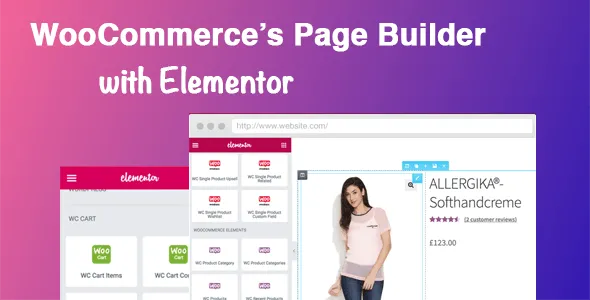
DHWC Elementor is a WooCommerce integration plugin designed to bridge the gap between WooCommerce’s data-driven architecture and Elementor’s visual page-building workflow. By default, WooCommerce product pages are generated through rigid template files controlled by the active theme. Elementor, while powerful, cannot natively restructure these pages beyond surface-level widgets. DHWC Elementor solves this limitation by exposing WooCommerce product data through dedicated shortcodes and Elementor-compatible elements, enabling fully custom product page layouts without breaking WooCommerce logic.
This page explains how DHWC Elementor works internally, what changes after installation, how it affects WooCommerce rendering, and why it is used by store owners who need design flexibility without sacrificing stability, SEO, or long-term maintainability.
Elementor excels at static and dynamic page layouts, but WooCommerce product pages are not standard WordPress pages. They rely on server-side rendering, conditional hooks, and template logic that Elementor does not override by default.
This creates common limitations:
DHWC Elementor addresses this by making WooCommerce product components accessible inside Elementor’s layout system.
Once activated, DHWC Elementor introduces WooCommerce-specific shortcodes and elements that can be placed directly inside Elementor templates. Product titles, prices, ratings, images, add-to-cart buttons, and metadata become modular building blocks rather than fixed outputs.
WooCommerce continues to manage products, inventory, pricing, and checkout logic. DHWC Elementor only controls how and where these elements appear, allowing layouts to be customized visually while preserving WooCommerce’s backend reliability.
DHWC Elementor operates by mapping WooCommerce hooks and data outputs to Elementor-renderable components. Instead of replacing WooCommerce templates outright, it injects structured shortcodes that pull live product data during page rendering.
This ensures compatibility with WooCommerce updates and avoids the fragility of manual template overrides. Because data is rendered dynamically, changes to products automatically reflect in custom layouts without manual updates.
With DHWC Elementor, product pages can be designed like landing pages while retaining full eCommerce functionality. Store owners commonly use it to:
This approach allows marketing and design teams to iterate quickly without developer involvement.
DHWC Elementor does not change product URLs, schema, or WooCommerce data structures. When implemented responsibly, it preserves search visibility and indexing behavior.
However, excessive layout complexity or heavy Elementor widgets can impact performance. Best results come from balancing design flexibility with clean content hierarchy and fast-loading components.
DHWC Elementor focuses on layout and presentation, not business rules. It does not replace pricing engines, checkout customization plugins, or inventory management tools.
Compatibility should be tested with themes that heavily customize WooCommerce templates. While most standard themes work well, highly opinionated themes may require adjustment.
Over time, DHWC Elementor functions as a design infrastructure layer. As WooCommerce evolves, updates typically ensure compatibility with new versions rather than altering core behavior.
Because layouts are built with Elementor, they remain editable and reusable, reducing technical debt and preserving flexibility as stores grow.
This plugin is best suited for WooCommerce store owners who rely on Elementor and need full visual control over product pages without writing PHP or overriding theme files.
Stores satisfied with default WooCommerce layouts or minimal customization may not need this level of control.
It restructures the frontend layout while keeping WooCommerce logic intact.
Yes, layouts can be customized and applied selectively based on configuration.
No, it is designed to remain compatible with core WooCommerce updates.
Core functionality works with Elementor, though advanced layouts may benefit from Pro features.
Yes, WooCommerce product types remain fully supported.
Yes, disabling templates restores theme-based WooCommerce layouts.
Typical updates include:
Before downloading DHWC Elementor, evaluate how much control you need over WooCommerce product page design. If Elementor is central to your workflow and default WooCommerce templates limit creativity or conversion optimization, DHWC Elementor provides a stable and scalable solution for building fully custom product experiences.
Geotoko is a trusted GPL website for WordPress themes, plugins, Shopify templates, and free giveaways. Download original, secure GPL files with lifetime updates.
All products on Geotoko are fully licensed under the GNU General Public License (GPL) and are independently reviewed for safety and quality.