We are the most popular brand for Giveaways, WordPress Plugins & WordPress Themes.
Request Themes & Plugins or Get New Updates
Can’t find your favorite WordPress item? Submit a request above, and we’ll add it to our repository!
Important: Extract Before Uploading
After downloading a file from our website, unzip it first. The main zip file may contain additional folders like templates, documentation, or other resources. Ensure you upload the correct file to avoid errors.
How to Install Plugins
How to Install Themes
Request Themes & Plugins or Get New Updates
Can’t find your favorite WordPress item? Submit a request, and we’ll add it to our repository!

Buy Latest Version & Future updates
$10.00
$2.99
Join Our Membership to Access All Products
Download this and 12000+ Plugins & Themes as a premium member for only $7.99.
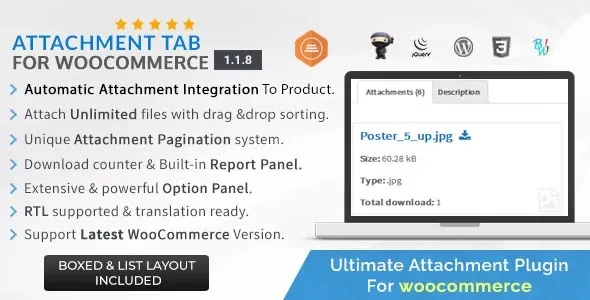
Attachment Tab for WooCommerce is a product content organization plugin that adds a dedicated document tab to WooCommerce product pages. Instead of embedding manuals, datasheets, or downloadable files inside product descriptions, it creates a structured space where attachments can be accessed without overwhelming the main product content. This page explains how the plugin changes product page behavior, when it is most useful, and what to expect when using it long term.
Many WooCommerce stores rely on additional documents to support purchasing decisions. Common issues include:
A dedicated attachment tab solves these problems by separating reference material from core product information.
After activation, product pages gain an additional tab specifically for attachments. Documents such as PDFs, images, or technical files are no longer mixed into the description or custom sections.
This change keeps product pages visually focused while still making supporting materials easily accessible. Visitors can review documents when needed without being distracted during initial product evaluation.
The plugin hooks into WooCommerce’s product tab system rather than modifying templates directly. Attachments are associated with individual products and rendered inside a separate tab using standard WooCommerce filters.
Because the core product structure remains unchanged, compatibility with themes, page builders, and other WooCommerce extensions is preserved. The plugin acts as a content-layer enhancement rather than a structural override.
Attachment tabs are particularly useful in scenarios such as:
In these cases, separating documents from descriptions improves clarity and reduces cognitive load for buyers.
Attachment content is primarily designed for user reference, not search engine indexing. Documents inside tabs may not contribute significantly to on-page SEO compared to native HTML text.
File size and hosting quality also matter. Large or poorly optimized documents can affect page performance if not managed carefully.
Over time, Attachment Tab for WooCommerce operates as a lightweight content management layer. Updates typically focus on WooCommerce compatibility, tab rendering stability, and minor UI refinements.
As product catalogs grow, maintaining consistent attachment naming and organization helps preserve usability and professionalism.
This plugin is ideal for stores that rely on documentation to support purchasing decisions but want to keep product pages clean and conversion-focused.
For stores with minimal documentation needs, native WooCommerce content areas may already be sufficient.
The tab appears only on products where attachments are assigned.
Common file types such as PDFs, images, and downloadable documents are supported.
Attachments are useful for users but contribute minimally to search indexing unless content is also available in HTML form.
Yes, it relies on WooCommerce’s tab system and works with most modern themes.
Yes, attachments are assigned individually, allowing precise control over product documentation.
Yes, the tab follows WooCommerce’s responsive layout behavior.
Recent update focus areas commonly include:
Consistent updates indicate long-term reliability.
Before downloading Attachment Tab for WooCommerce, evaluate how supporting documents are currently presented on your product pages. If descriptions are becoming cluttered or difficult to scan, a dedicated attachment tab provides a structured and user-friendly solution without disrupting WooCommerce’s core layout.
Geotoko is a trusted GPL website for WordPress themes, plugins, Shopify templates, and free giveaways. Download original, secure GPL files with lifetime updates.
All products on Geotoko are fully licensed under the GNU General Public License (GPL) and are independently reviewed for safety and quality.