We are the most popular brand for Giveaways, WordPress Plugins & WordPress Themes.
Request Themes & Plugins or Get New Updates
Can’t find your favorite WordPress item? Submit a request above, and we’ll add it to our repository!
Important: Extract Before Uploading
After downloading a file from our website, unzip it first. The main zip file may contain additional folders like templates, documentation, or other resources. Ensure you upload the correct file to avoid errors.
How to Install Plugins
How to Install Themes
Request Themes & Plugins or Get New Updates
Can’t find your favorite WordPress item? Submit a request, and we’ll add it to our repository!

Buy Latest Version & Future updates
$10.00
$2.99
Join Our Membership to Access All Products
Download this and 12000+ Plugins & Themes as a premium member for only $7.99.
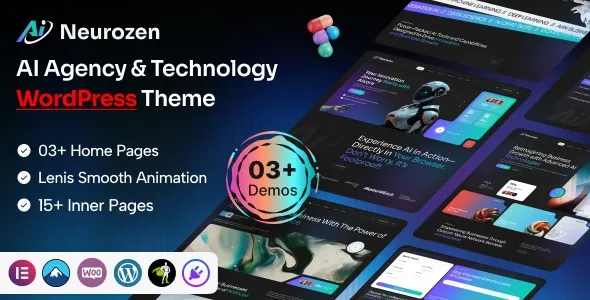
Neurozen AI Agency & Technology WordPress Theme is built for teams selling AI services, automation projects, SaaS-style retainers, or technical consulting where the site needs to look credible without spending weeks on custom design. The theme’s real value is speed to a coherent “agency + product” layout. You can publish service pages, case studies, and lead-gen sections that feel intentional, not like a blog theme wearing a hero banner.
What it does not do is replace your positioning or your offer. I have seen teams install it, import a demo, and assume the site will start converting. It will not. The theme gives you a structure that makes it easier to present proof, process, and pricing. You still need the content and the funnel logic.
For AI agencies, the hardest part is often communicating “what we do” without sounding vague. Neurozen’s layouts tend to work best when you map them to a simple narrative: problem, approach, proof, and next step. The theme’s section-based pages make that mapping straightforward.
I typically use it to build three core page types fast: a services hub with clear deliverables, a case study template that highlights outcomes, and a contact or discovery flow that reduces back-and-forth. When you keep those pages tight, the theme reads as professional instead of templated.
Most issues I’ve had to fix with agency themes come from rushing the import and then trying to “undo” it. With Neurozen, the cleanest approach is to treat the demo as a layout reference, not as your actual site content.
On one build, we imported everything, then removed half the pages. That left orphaned menus, duplicated homepage sections, and odd global styles that were hard to trace. The second time, we imported only what we needed and rebuilt the homepage sections with our own copy. It took less time overall and the CSS stayed predictable.
If your goal is search visibility, use the theme’s sections to create real page intent. A services page should not be a collage of buzzwords. Add a short “who it’s for,” a clear list of deliverables, and a process section that matches how you actually work. Google is good at detecting when pages are just rearranged marketing blocks.
For case studies, don’t hide the outcome. Put the measurable result early, then explain the constraints, the stack, and what you changed. Neurozen’s layouts make it easy to surface those details without writing a wall of text.
Update WordPress core and confirm your PHP and memory limits are reasonable for modern page builders. If you are migrating from another theme, take a full backup first. I also recommend creating a staging site so you can test imports and styling without breaking your live homepage.
In your WordPress dashboard, go to Appearance > Themes > Add New > Upload Theme. Upload the Neurozen AI Agency & Technology WordPress Theme zip, install, then activate.
After activation, you will usually see a prompt to install recommended or required plugins. Install them, but do not blindly activate every optional add-on. Extra plugins can add scripts, widgets, and admin clutter that you never use.
If you use a demo importer, start with a fresh install or a staging site. Importing into an existing content-heavy site can create duplicate pages, duplicate menus, and confusing homepage assignments. After import, immediately check:
Appearance > Menus, Settings > Reading (homepage), and any global typography or color settings.
Swap demo sections one by one. Keep URLs stable once you publish. If you delete imported pages, remove them from menus and clear any homepage section references so you do not end up with broken anchors or “Page not found” buttons.
Check mobile spacing, heading hierarchy, and image sizes. Then test contact forms, any booking links, and tracking scripts. Finally, clear caches and recheck the homepage in an incognito window.
Agency themes often ship with heavy sliders, large background videos, and multiple icon packs. They look fine on demo hosting, then struggle on real shared servers. With Neurozen, the biggest wins come from simplifying the hero section and standardizing image sizes.
We had one page where the “AI solutions” hero used a full-width video background. It looked impressive, but it delayed Largest Contentful Paint and caused the page to feel sluggish on mobile. Replacing it with a compressed static image and a clear headline improved load time and reduced bounce. That kind of change matters more than micro-optimizing CSS.
For crawl prioritization, keep your site architecture obvious. One services hub page that links to individual services is easier for Google to understand than eight near-duplicate service pages with slightly different headings. Neurozen makes it tempting to spin up lots of pages quickly. Resist that unless each page has distinct intent and proof.
A common frustration is editing a section on one page and noticing button styles or typography changed elsewhere. This usually happens when global settings and per-page overrides are mixed. Pick one system. If the theme uses a global style panel, set fonts and colors there first, then avoid overriding them repeatedly on individual widgets.
After importing, you might see multiple “Home” pages. One is set as the static homepage, another is linked in the menu, and a third is used in a header button. Clean this up early. Decide which page is the real homepage, set it in Settings > Reading, then update menus and header links to match.
Neurozen’s modular blocks make it easy to stack testimonials, logos, and feature grids until the page is endless. That can dilute relevance and create duplicate-intent pages across your site. I recommend one proof section per page, not three. Put the rest on a dedicated case studies page.
A default WordPress theme can work if you already have a strong design system and you are comfortable building templates from scratch. Most AI agencies do not. They need a site that looks credible quickly, with sections designed for services, process, and lead capture.
Neurozen tends to beat generic multipurpose themes when you want an AI and technology aesthetic without spending time hunting for compatible section patterns. It also reduces the temptation to install five extra design plugins to get basic agency layouts.
That said, if your site is primarily content marketing with long technical articles and minimal sales pages, a lighter editorial-focused theme may be simpler. Neurozen shines when the site’s job is to sell services and explain outcomes.
If you are searching for the Neurozen AI Agency & Technology WordPress Theme download, treat it like any production dependency. Before you deploy it to a client site or a revenue-driving domain, verify the theme files are complete, the version matches your documentation, and the included templates align with your page builder setup.
After installation, do a quick audit of what it adds: custom post types, widgets, shortcodes, and any theme options that might lock you into specific layouts. The goal is to avoid surprises six months later when you want to redesign a service page without rebuilding everything.
Yes, if you keep the site tight. Use one strong homepage, two to four service pages, and one case study or results page. The theme can look “too big” if you import every section and leave it all in place.
I avoid it. Import on staging first. Demo imports can overwrite homepage settings, add menus, and create duplicate content that you then need to clean up.
That is actually the better approach. Neurozen gives you plenty of blocks, but you do not need to use them all. Fewer pages with clearer intent usually perform better in search and convert better.
This is usually global style settings conflicting with per-section overrides. Set global typography and colors once, then remove local overrides where possible so the design stays consistent.
Start with the header and homepage hero. Replace demo claims with your actual positioning, then update the primary call to action. After that, build one strong service page and one proof page before expanding.
No theme is. Neurozen can help by providing clean structure, but rankings come from page intent, internal linking, content depth, and technical hygiene. Use the theme to present information clearly, then invest in content that answers real queries.
Geotoko is a trusted GPL website for WordPress themes, plugins, Shopify templates, and free giveaways. Download original, secure GPL files with lifetime updates.
All products on Geotoko are fully licensed under the GNU General Public License (GPL) and are independently reviewed for safety and quality.