We are the most popular brand for Giveaways, WordPress Plugins & WordPress Themes.
Request Themes & Plugins or Get New Updates
Can’t find your favorite WordPress item? Submit a request above, and we’ll add it to our repository!
Important: Extract Before Uploading
After downloading a file from our website, unzip it first. The main zip file may contain additional folders like templates, documentation, or other resources. Ensure you upload the correct file to avoid errors.
How to Install Plugins
How to Install Themes
Request Themes & Plugins or Get New Updates
Can’t find your favorite WordPress item? Submit a request, and we’ll add it to our repository!

Buy Latest Version & Future updates
$10.00
$2.99
Join Our Membership to Access All Products
Download this and 12000+ Plugins & Themes as a premium member for only $7.99.
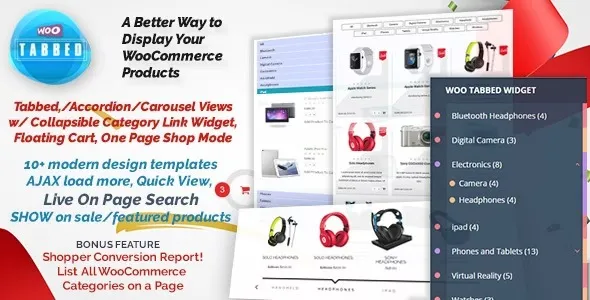
WooCommerce Tabbed Category Product Listing Pro is a catalog presentation plugin that reorganizes how products from multiple categories are displayed on a single page. Instead of spreading related products across multiple archive pages, it introduces a tab-based layout that allows users to switch between categories without leaving the page. This page explains how the plugin changes WooCommerce catalog behavior, where it fits best, and what to consider before using it in a live store.
As product catalogs grow, standard WooCommerce category pages can become inefficient and difficult to navigate. Common issues include:
Tabbed category layouts address these issues by grouping related products into a single, interactive interface.
Once activated, WooCommerce Tabbed Category Product Listing Pro introduces a tab-driven product display system that can be embedded on shop pages, landing pages, or custom layouts. Categories become navigational tabs rather than separate destinations.
This changes the browsing experience significantly. Shoppers remain on one page while switching between product groups, reducing friction and improving product discovery without altering the checkout flow.
The plugin retrieves products from selected WooCommerce categories and renders them inside a tab container using AJAX or dynamic loading, depending on configuration. This allows category switching without full page reloads.
WooCommerce’s core product data, pricing, and add-to-cart functionality remain intact. The plugin focuses solely on presentation logic, making it compatible with most themes and extensions that rely on standard WooCommerce hooks.
Tabbed category displays are particularly effective in scenarios such as:
In these cases, tabs help guide user attention without overwhelming them with long product grids.
Tabbed layouts prioritize user experience over traditional category SEO. Because content is grouped on a single page, individual category archives may receive less direct traffic.
Performance depends on the number of products loaded per tab. Loading too many products simultaneously can affect page speed, making selective configuration important.
Over time, the plugin acts as a frontend organization tool rather than a core store dependency. Updates usually focus on compatibility with WooCommerce releases, improved loading behavior, and UI refinements.
Store owners should periodically review tab configurations to ensure product groupings remain relevant as the catalog evolves.
This plugin is well suited for stores that want to highlight multiple product categories in a limited space. It works best for curated catalogs, promotional landing pages, and stores focused on guided browsing.
For stores that rely heavily on category-level SEO traffic, traditional archive pages should remain part of the overall strategy.
No, it provides an alternative display method while standard category archives remain available.
Yes, tabbed category listings can be embedded on pages, posts, or custom layouts using shortcodes or blocks.
Depending on configuration, products can be loaded dynamically to reduce initial page load time.
Because it relies on standard WooCommerce hooks, it is compatible with most modern themes.
Tabbed layouts improve UX but should complement, not replace, traditional category pages for SEO purposes.
Yes, but performance depends on how many products are displayed per tab and server resources.
Recent update trends typically include:
Regular updates indicate active maintenance and long-term usability.
Before downloading WooCommerce Tabbed Category Product Listing Pro, evaluate how users currently navigate your catalog. If page clutter and excessive navigation are limiting product discovery, tabbed category listings provide a structured, user-friendly alternative without disrupting WooCommerce’s core behavior.
Geotoko is a trusted GPL website for WordPress themes, plugins, Shopify templates, and free giveaways. Download original, secure GPL files with lifetime updates.
All products on Geotoko are fully licensed under the GNU General Public License (GPL) and are independently reviewed for safety and quality.