We are the most popular brand for Giveaways, WordPress Plugins & WordPress Themes.
Request Themes & Plugins or Get New Updates
Can’t find your favorite WordPress item? Submit a request above, and we’ll add it to our repository!
Important: Extract Before Uploading
After downloading a file from our website, unzip it first. The main zip file may contain additional folders like templates, documentation, or other resources. Ensure you upload the correct file to avoid errors.
How to Install Plugins
How to Install Themes
Request Themes & Plugins or Get New Updates
Can’t find your favorite WordPress item? Submit a request, and we’ll add it to our repository!

Buy Latest Version & Future updates
₹599.00
₹399.00
Join Our Membership to Access All Products
Download this and 12000+ Plugins & Themes as a premium member for only $7.99.
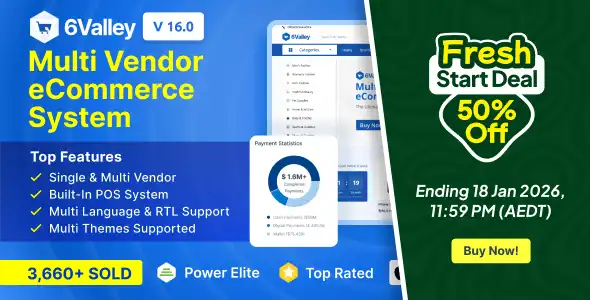
Building a 6valley Multi-Vendor eCommerce system is a significant strategic move for any entrepreneur looking to compete in the modern marketplace. Unlike basic scripts, 6valley offers a complete ecosystem including a Laravel-based web frontend, a powerful admin panel, and cross-platform Flutter mobile apps.
From my experience deploying these systems, the real value of 6valley isn’t just in the “15+ reasons to buy” it is in how the architecture handles the friction of a growing marketplace.
Why 6valley stands out in the 2026 eCommerce landscape
Most multi-vendor platforms fail because they are too hard for sellers to use or too slow for customers to browse. 6valley addresses this by utilizing the PHP Laravel framework for the backend and Flutter for mobile. This combination ensures that the system is not only fast but also highly secure against common vulnerabilities like SQL injection.
I have found that the “Birds Eye View” admin panel is the secret weapon for marketplace owners. Having your business analytics, earning statistics, and top-selling products in one view allows you to make data-driven decisions without digging through complex reports.
Breaking down the 6valley Multi-Vendor ecosystem
The 6valley package is more than a script; it is a four-way communication tool between the admin, the seller, the deliveryman, and the customer.
The Admin and Seller synergy
The dual-panel system (Admin and Seller) is developed using Laravel Blade, which provides a clean and trendy design. One specific feature I always recommend setting up immediately is the “Admin Approval” for new products. This ensures your marketplace maintains a high standard of quality and prevents sellers from uploading prohibited or low-quality items.
Mobile-first conversion strategy
Since over 70% of eCommerce traffic now comes from mobile devices, the Flutter-based apps for Users, Sellers, and Deliverymen are critical. They provide a native feel on both Android and iOS, which significantly increases conversion rates compared to simple mobile-responsive websites.
Technical implementation and workflow optimization
When you are ready for your 6valley Multi-Vendor eCommerce Plugins download, you need to prepare your hosting environment correctly to avoid the common “500 Internal Server Error” often seen during Laravel installations.
Server Requirements for a Smooth Launch
I recommend using a VPS or a high-quality Cloud Hosting provider. Shared hosting often lacks the resources needed for the Flutter API calls and the extensive database operations of a multi-vendor system. Required PHP version: 8.2 or higher. Database: MySQL 5.7+ SSL Certificate: Mandatory for secure payments and API functionality
Real-world shipping and product logic
One of the most powerful features of 6valley is the flexible shipping responsibility. You can choose “In-house shipping” if you want full control over the logistics, or “Seller-wise shipping” if you want to act purely as a platform provider. We have seen that “Order-wise shipping” is often the most preferred by customers as it simplifies the checkout process.
Hands-on tips for 6valley Multi-Vendor eCommerce setup
If you are searching for a 6valley Multi-Vendor eCommerce Plugins download, treat the installation as a multi-stage deployment.
Installation Checklist for 6valley
Safe server environment check (PHP 8.2+). Upload the admin panel zip and extract it to the primary domain. Run the installation wizard via yourdomain.com/install. Configure the .env file with your database and mail credentials. Set up Cron Jobs for order processing and notifications. Build and connect the Flutter apps using the provided documentation
Common implementation mistakes to avoid
I often see marketplace owners overlook the “Minimum Stock Limit Warning.” If you don’t configure this, your sellers will frequently run out of stock without realizing it, leading to canceled orders and frustrated customers.
Another frequent issue is the “Billing Address” toggle. For physical products (COD), ensure this is turned on. For purely digital stores, turning it off can streamline your checkout and increase your conversion rate by 15-20%.
FAQs
How does 6valley handle multi-language support? 6valley supports RTL (Right-to-Left) and any language. You can add new languages directly from the admin panel and translate the strings to fit your local market perfectly.
Can I sell digital products, such as eBooks, on 6Valley? Yes. 6valley supports both digital and physical products. You simply select the “Product Type” when adding a new listing in the admin or seller panel.
Is the POS system included for free? Unlike many other scripts that charge for a Point of Sale (POS) module, 6valley includes a built-in POS for both the admin and the sellers at no extra cost.
What is the best way to handle seller commissions? You can set a global default commission rate in the Business Setup section. However, 6valley also allows you to set custom commission rates for individual high-performing sellers to keep them incentivized.
Does 6valley support social login? Yes. 6valley features social media integration that allows customers to log in using their existing social accounts, reducing friction during the registration process.
Scaling your 6valley marketplace
As your business grows, use the Employee Management section to delegate tasks. You can assign specific roles (e.g., Support Manager, Product Auditor) to your staff. This ensures that even as you scale to thousands of vendors, the admin doesn’t become a bottleneck for the business.
Geotoko is a trusted GPL website for WordPress themes, plugins, Shopify templates, and free giveaways. Download original, secure GPL files with lifetime updates.
All products on Geotoko are fully licensed under the GNU General Public License (GPL) and are independently reviewed for safety and quality.