We are the most popular brand for Giveaways, WordPress Plugins & WordPress Themes.
Request Themes & Plugins or Get New Updates
Can’t find your favorite WordPress item? Submit a request above, and we’ll add it to our repository!
Important: Extract Before Uploading
After downloading a file from our website, unzip it first. The main zip file may contain additional folders like templates, documentation, or other resources. Ensure you upload the correct file to avoid errors.
How to Install Plugins
How to Install Themes
Request Themes & Plugins or Get New Updates
Can’t find your favorite WordPress item? Submit a request, and we’ll add it to our repository!

Buy Latest Version & Future updates
$15.00
$4.99
Join Our Membership to Access All Products
Download this and 12000+ Plugins & Themes as a premium member for only $7.99.
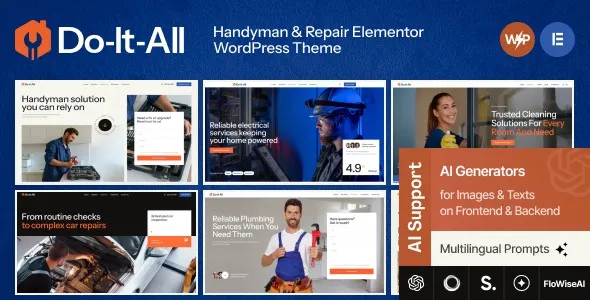
Most handyman and repair sites fail for boring reasons. The phone number is buried, the service areas are unclear, and the “request a quote” flow is a dead end on mobile. The Do-It-All Handyman & Repair Elementor WordPress Theme is built around fixing those basics fast, with Elementor layouts that push calls, forms, and service pages to the front.
I have set this type of theme up for small trades businesses where the owner edits the site between jobs. The win is not “more design options.” The win is fewer places to get lost in WordPress, and a page structure that makes sense for quoting, scheduling, and local trust signals.
This theme is most useful when you want a clear service catalog and a conversion path that does not depend on a blog. In practice, it supports a simple but effective pattern: service landing pages, a few location pages, a quote request form, and a lightweight project gallery.
Elementor is the center of gravity here. You are not locked into a single homepage layout. You can keep the provided sections and swap the copy, or rebuild sections in Elementor while keeping the same visual language.
Where I see it work best is when you treat it like a framework for local service SEO. Each service gets its own page with a consistent layout, pricing expectations, and “what’s included” content. That reduces duplicate-intent issues that happen when people try to rank one generic “Services” page for everything.
If you start from a blank multipurpose theme, you usually spend hours recreating the same components: service cards, before and after blocks, testimonial sliders, and a quote form section that looks intentional. Then you repeat it across pages and you end up with inconsistent spacing and typography.
With Do-It-All Handyman & Repair Elementor WordPress Theme, the time savings comes from having those patterns already designed. When we onboard a new trade client, the first week is usually about content and photos, not layout decisions. That is the difference.
For repair businesses, E-E-A-T is not an abstract guideline. It is the difference between “random contractor” and “someone I will let into my home.” This theme’s structure makes it easier to place the signals Google and humans look for: clear business identity, service area coverage, reviews, credentials, and proof of work.
What I recommend adding early, even if you keep the demo layout, is a dedicated “About” section that includes who does the work, how long you have been operating, and what you will not do. That last part sounds odd, but it reduces bad leads and builds credibility.
The most common issue we see is importing demo content and assuming the typography and spacing will match the site’s settings. Elementor can store styles at the widget level, section level, and global level. If you start editing before setting global fonts and colors, you end up chasing inconsistencies across pages.
Another friction point is mobile. Handyman sites often have sticky headers, click-to-call buttons, and compact hero sections. If you stack too many widgets above the fold, the call button gets pushed down and conversions drop. We usually trim the hero to one message, one button, and one trust line.
Also watch image weight. The gallery sections look great, but a handful of uncompressed phone photos can tank performance. Compress your images before upload and avoid carousels with dozens of slides on the homepage.
If you only need a single page with a phone number and a contact form, this theme may be more than you need. A basic block theme with a simple layout can be faster to maintain.
Where Do-It-All Handyman & Repair Elementor WordPress Theme makes sense is when you want multiple service pages, consistent design across them, and the ability for non-technical staff to adjust sections without touching code.
Update WordPress core, your active plugins, and your PHP version in hosting if needed. Theme installs are where older environments show their cracks.
Keep the theme zip intact. If you extracted it and re-zipped the wrong folder, WordPress will reject it. If you are searching for the Do-It-All Handyman & Repair Elementor WordPress Theme download, make sure you are getting the actual theme zip and not just documentation files.
In WordPress, go to Appearance > Themes > Add New > Upload Theme. Upload the zip, install, then activate.
After activation, you will typically be prompted to install companion plugins. Install them first, then return to the theme setup. If Elementor is part of the stack, confirm it is activated before importing templates.
Use the theme’s importer if provided. Import pages and templates first, then import widgets or other extras. I usually skip importing media if the package includes lots of stock images. It keeps the library clean and reduces bloat.
Configure global fonts, colors, and button styles. This prevents the “why is this button different on every page” problem later.
Set your homepage under Settings > Reading. Build your primary menu, then set permalinks to a clean structure. After that, test the site on mobile and click every call and form button.
You still need Elementor if the theme’s layouts are built with it. The theme provides the design system and templates. Elementor is the editor that lets you modify those templates.
Yes, but do it intentionally. Keep the core service description consistent, then add unique elements per area, such as response times, local landmarks, or area-specific FAQs. We also vary testimonials by area when possible.
Usually it is missing a plugin, global styles were not applied, or the header and footer templates were not assigned. Check Elementor’s Theme Builder assignments and confirm the correct header/footer are active site-wide.
It can be, as long as you keep the store section simple. For many repair businesses, a single “Book a service” product or a deposit product works better than a full catalog. Make sure the checkout is mobile-friendly and does not distract from calls.
Put one primary action on every service page. Either “Call now” or “Request a quote.” Then add proof near that action: review snippets, insurance or certification notes, and a short “what happens next” line.
No theme ranks a site by itself. It helps you publish a clean structure and consistent service pages. Rankings come from content quality, local relevance, technical health, and trust signals like reviews and clear business information.
If you heavily edit templates, updates can overwrite files depending on how the theme is built. We typically use a child theme when custom code is involved and keep major layout edits inside Elementor templates so updates are less risky.
Geotoko is a trusted GPL website for WordPress themes, plugins, Shopify templates, and free giveaways. Download original, secure GPL files with lifetime updates.
All products on Geotoko are fully licensed under the GNU General Public License (GPL) and are independently reviewed for safety and quality.