We are the most popular brand for Giveaways, WordPress Plugins & WordPress Themes.
Request Themes & Plugins or Get New Updates
Can’t find your favorite WordPress item? Submit a request above, and we’ll add it to our repository!
Important: Extract Before Uploading
After downloading a file from our website, unzip it first. The main zip file may contain additional folders like templates, documentation, or other resources. Ensure you upload the correct file to avoid errors.
How to Install Plugins
How to Install Themes
Request Themes & Plugins or Get New Updates
Can’t find your favorite WordPress item? Submit a request, and we’ll add it to our repository!

Buy Latest Version & Future updates
$15.00
$4.99
Join Our Membership to Access All Products
Download this and 12000+ Plugins & Themes as a premium member for only $7.99.
Most sports clubs and training programs start on WordPress with a generic business theme, then spend months patching it into something that feels like a team site. The friction usually shows up in the same places: schedules that are hard to scan on mobile, roster and coach pages that look like blog posts, and a shop that feels bolted on rather than part of the brand.
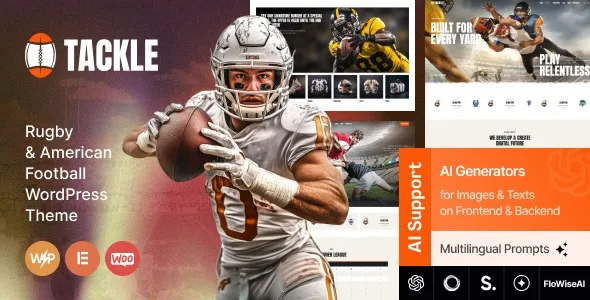
The Tackle Rugby & American Football WordPress Theme is built around that reality. It gives you a layout system that already assumes you will publish fixtures, results, player profiles, and news, while still keeping WooCommerce usable for merch and tickets. When I tested it on a live install, the first thing I noticed was that the content types and page templates reduce the “blank canvas” problem. You spend less time deciding structure and more time filling in real club information.
Tackle is best thought of as a sports publishing and commerce foundation. It helps you present a club or team with clear navigation, visual hierarchy for match content, and a shop that matches the rest of the site.
Where it shines is the combination of editorial pages and conversion pages. You can run match reports and announcements without burying your store, and you can sell products without making the site feel like a generic WooCommerce catalog.
What it does not magically do is run league logic for you. If you need automated standings, complex fixtures, or data imports from a federation feed, you will still rely on a dedicated sports plugin or custom integration. We have seen teams overestimate this and then blame the theme when the real gap is structured sports data.
On a standard theme, “Team” becomes a page with a grid of images, and “Schedule” becomes a PDF link. With Tackle, the core pages are designed to be browsed, not just visited once.
I found it easiest to build around three content pillars:
1) Match and news content that reads well on mobile and does not collapse into endless sidebars.
2) Identity pages like coaches, players, and club history that look like a sports site, not a corporate “About” page.
3) Shop and conversion pages for merch, memberships, or tickets that stay visually consistent with the rest of the theme.
If you are trying to reduce bounce from social traffic, this matters. Sports audiences often come from Instagram, X, or local press links. They land deep, skim fast, and decide in seconds if the site is credible.
The most common breakage I ran into was not the theme itself. It was the stack around it. Teams often install multiple page builders, slider plugins, and “all-in-one” optimization tools, then wonder why layouts feel inconsistent.
Three practical fixes that helped:
Keep one layout system. If you use the theme’s builder approach, do not mix it with a second builder for random pages. That is how you get spacing mismatches and weird typography inheritance.
Be careful with aggressive CSS/JS optimization. Minification and delayed scripts can break interactive elements on homepages and shop filters. When we saw flickering headers and missing icons, excluding the theme’s core scripts from delay fixed it quickly.
Do not import demo content and leave it half-edited. Search engines are good at spotting thin, duplicated template text. If you import, commit to rewriting every public-facing page. Otherwise you end up indexing placeholder copy that competes with your real pages.
Tackle is comfortable when you move from a handful of pages to a real publishing cadence. The navigation patterns and template variety help when you have multiple squads, youth programs, or a growing archive of match reports.
Where you should plan ahead is media weight. Sports sites love huge hero images and highlight galleries. If you let uncompressed uploads pile up, Core Web Vitals will suffer and Google will crawl more slowly. On one club site we improved crawl consistency simply by standardizing image sizes and converting older galleries to modern formats.
Also consider URL structure early. If you will publish “Results” for years, choose a clean taxonomy strategy and stick to it. Themes can help presentation, but they cannot undo a messy content model without redirects and reindexing pain.
A generic WooCommerce theme can sell products, but it rarely communicates “club” without heavy customization. You end up building sports pages from scratch and then trying to make the store match them. That is backwards for most teams.
Tackle starts from the sports identity side and then supports commerce. In practice, that means your homepage and category pages can feel like a club hub, not a storefront with a blog attached.
If your site is purely a shop and you do not publish fixtures, rosters, or regular news, you may not need a sports-focused theme. In that case a lightweight store theme will be easier to tune for speed. But if your content and community matter, the sports-first structure is the point.
If you are searching for the Tackle Rugby & American Football WordPress Theme download, treat it like any other production dependency. The goal is a clean install, predictable updates, and no surprises with plugins.
Clone your site to staging and confirm PHP and WordPress versions match production. Do not test a theme switch on the live site if you have active WooCommerce orders.
In WordPress, go to Appearance > Themes > Add New > Upload Theme. Upload the zipped theme file and install it. If the package includes a child theme, install that too and activate the child theme for safer customization.
After activation, follow the theme prompts to install companion plugins. Only install what you will use. Every extra plugin increases the chance of conflicts, especially on sports sites that already run event or roster tools.
Demo import can save time, but it also imports pages you must rewrite. If you import, immediately remove unused demo pages and replace placeholder text before letting Google index them.
Set shop, cart, checkout, and account pages. Then verify product grids, product pages, and checkout styling. I always run a test purchase in staging to catch layout issues early.
Check the homepage, a match/news page, a roster-style page, and a product page on mobile. Then run a quick performance scan. If scripts are delayed or combined, confirm icons, menus, and sliders still work.
Deploy during a low-traffic window. Keep a full backup and know how to revert quickly if the header, checkout, or navigation behaves differently on production caching.
Yes for standard product catalogs, merch, and simple ticket-style products. You still need to configure WooCommerce properly, and you should test checkout styling with your payment gateway.
Not by itself. The theme can present sports content cleanly, but automated standings and data feeds typically require a dedicated sports plugin or custom development.
If you plan to change templates, functions, or add custom styling beyond a few CSS tweaks, use a child theme. It prevents your changes from being overwritten during updates.
The two biggest culprits I see are caching/optimization settings that delay theme scripts, and mixing multiple builders or block libraries on the same site.
Yes, as long as you define a clear content structure. The theme’s sports styling fits rugby and American football naturally, but with disciplined typography and imagery it can represent broader programs too.
Either import on staging and delete unused pages before launch, or set demo pages to noindex until rewritten. The biggest SEO mistake is leaving placeholder text live and letting it get crawled.
Geotoko is a trusted GPL website for WordPress themes, plugins, Shopify templates, and free giveaways. Download original, secure GPL files with lifetime updates.
All products on Geotoko are fully licensed under the GNU General Public License (GPL) and are independently reviewed for safety and quality.