We are the most popular brand for Giveaways, WordPress Plugins & WordPress Themes.
Request Themes & Plugins or Get New Updates
Can’t find your favorite WordPress item? Submit a request above, and we’ll add it to our repository!
Important: Extract Before Uploading
After downloading a file from our website, unzip it first. The main zip file may contain additional folders like templates, documentation, or other resources. Ensure you upload the correct file to avoid errors.
How to Install Plugins
How to Install Themes
Request Themes & Plugins or Get New Updates
Can’t find your favorite WordPress item? Submit a request, and we’ll add it to our repository!

Buy Latest Version & Future updates
₹500.00
₹199.00
Join Our Membership to Access All Products
Download this and 12000+ Plugins & Themes as a premium member for only $7.99.
Jewelry shops tend to break themes in quiet ways. Not with obvious errors, but with the slow stuff: inconsistent product image ratios, filters that feel “almost right,” and category pages that turn into endless scrolling with no intent. I have rebuilt a few jewelry stores where the theme looked great in the demo but fell apart once real inventory, real photography, and real shipping rules were added.
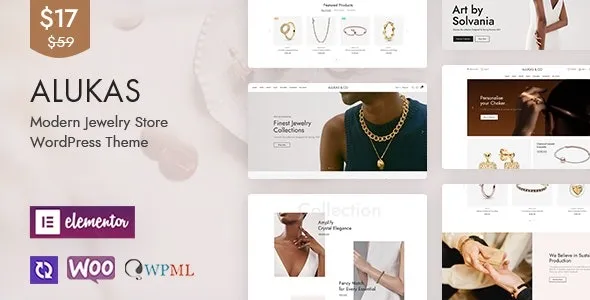
Download the Alukas Modern Jewelry Store WordPress Theme, which is built around that exact problem. It gives you a layout system that expects high-contrast product imagery, fast browsing, and a lot of variation across rings, earrings, sets, and seasonal drops. When you set it up carefully, it becomes a catalog engine rather than a pretty skin.
The strongest value in Alukas is that it pushes WooCommerce browsing ahead of page building. Category pages, product grids, quick views, and product detail layouts are treated as first-class parts of the store, not afterthoughts.
In practice, this means you can build a site where shoppers compare visually first, then narrow by attributes. That is important for jewelry because “size” and “material” are often more meaningful than “price range” early in the journey.
What you still have to decide is your merchandising logic. Alukas can display variations cleanly, but you have to define attributes consistently. If “Gold” is sometimes a product tag and sometimes an attribute, your filters will look complete but behave inconsistently. We fixed this in one store by rebuilding attributes from scratch and reassigning variations. The theme did not cause the issue, but it made the inconsistency more visible.
The fastest way to make a jewelry theme feel amateur is to import a demo and never normalize images. Alukas assumes a consistent crop strategy. If you mix square studio shots with tall lifestyle photos, grids will jump, and the “modern” look disappears.
Another time sink is treating product pages like blog posts. Jewelry shoppers want clarity: metal, stone, sizing, shipping, returns, and care. If you bury those in long paragraphs, you will get more pre-sale emails and lower add-to-cart rates. I recommend using short sections and repeatable blocks for care and sizing, even if your copy is custom per product.
Finally, don’t underestimate how much a store relies on search and filtering. If you plan to scale beyond a few dozen products, you should define attributes and filter behavior before you spend hours styling the homepage.
Alukas is most convincing on category and collection pages. When you add more products, the grid layout and product card design keep the store from feeling cluttered. That matters for jewelry because too many competing highlights can make everything look the same.
On larger catalogs, I’ve found two practical wins. First, shoppers can scan quickly without the page turning into a wall of text. Second, your merchandising becomes easier because you can create collections that are visually consistent without custom templates for each category.
If you are planning hundreds of SKUs, keep an eye on how you load product images. Use properly sized thumbnails and avoid uploading 6000px photos “just in case.” The theme can look fast or slow depending on your media discipline.
Generic multipurpose themes often let you build anything, but WooCommerce ends up feeling bolted on. You get a nice homepage and then a bland product archive with awkward spacing. With jewelry, that disconnect is obvious.
Alukas focuses on store pages first. You spend less time fighting default WooCommerce styling and more time tuning the catalog experience. If you have ever tried to make a general page builder theme feel like a boutique storefront, you know the pattern: it works, but it takes too many overrides, and updates become stressful.
That said, if your site is primarily editorial with a small shop on the side, a content-first theme might still be the better choice. Alukas shines when the store is the product.
Variation-heavy products can expose sloppy attribute naming. If you sell rings with size, metal, and stone options, make sure each attribute is global and reused consistently. Otherwise filters and variation selectors will look fragmented.
Quick view features are useful, but they can confuse shoppers if you rely on long product descriptions or complex sizing notes. I usually treat quick view as a “preview” and reserve anything critical for the full product page. If you try to cram everything into quick view, you will get more abandoned sessions.
Also watch your typography choices. Jewelry sites often pick thin fonts that look elegant but harm readability on mobile. I have seen conversion improve simply by increasing body font weight and line height while keeping headings refined.
Update WordPress and WooCommerce first. If you are migrating an existing store, take a full backup and export your products. I do this even on staging because theme changes can trigger template overrides and unexpected layout differences.
Keep the theme package intact. If you are looking for “Alukas Modern Jewelry Store WordPress Theme download,” make sure you are obtaining the original theme files and any included child theme or companion plugins from the source you trust. Avoid mixing files from different versions.
Go to Appearance → Themes → Add New → Upload Theme. Upload the theme zip, install, then activate. If a child theme is included, activate the child theme after the parent is installed.
Most store-focused themes rely on a small set of plugins for builders, sliders, or product features. Install only what you will actually use. Extra plugins increase maintenance and can slow down the admin experience.
Demo import is useful for layout references, but it can add pages, menus, and placeholder products you do not want. I often import on a fresh staging site, then recreate the important templates manually on the real store to keep the database clean.
Set currency, shipping zones, tax rules, and checkout settings. Then standardize attributes like Metal, Stone, Size, and Style. Do this before you build filters and navigation, as you will redo the work later.
Open category pages on mobile, test filtering, quick view, variation selection, add-to-cart, and checkout. Then test search and sorting. I also test with a slow connection profile because jewelry pages are image-heavy by nature.
Yes, but it depends on clean attribute setup. Use global attributes and consistent naming. If you mix custom attributes per product, filtering and variation UX will feel inconsistent across the catalog.
If you plan to edit templates, add custom functions, or change styling beyond the Customizer, use a child theme. It reduces update risk and keeps your changes organized.
It can. Demo imports often add extra pages, media, and widgets. If performance matters, import on staging for reference, then build only what you need on production and optimize images from day one.
This is almost always image ratio inconsistency. Normalize your product images to a consistent aspect ratio and regenerate thumbnails if needed. Once the media is consistent, the grid usually snaps into place.
It can be, especially if you want a boutique feel and strong product presentation. If you are not using filtering, collections, or a structured catalog, you may not benefit from all the store-first layout advantages.
Review product pages, cart, checkout, and any template overrides. I also check header behavior, mobile menu, and filtering. Most theme update surprises show up in WooCommerce templates and responsive spacing.
Geotoko is a trusted GPL website for WordPress themes, plugins, Shopify templates, and free giveaways. Download original, secure GPL files with lifetime updates.
All products on Geotoko are fully licensed under the GNU General Public License (GPL) and are independently reviewed for safety and quality.