We are the most popular brand for Giveaways, WordPress Plugins & WordPress Themes.
Request Themes & Plugins or Get New Updates
Can’t find your favorite WordPress item? Submit a request above, and we’ll add it to our repository!
Important: Extract Before Uploading
After downloading a file from our website, unzip it first. The main zip file may contain additional folders like templates, documentation, or other resources. Ensure you upload the correct file to avoid errors.
How to Install Plugins
How to Install Themes
Request Themes & Plugins or Get New Updates
Can’t find your favorite WordPress item? Submit a request, and we’ll add it to our repository!

Buy Latest Version & Future updates
₹500.00
₹199.00
Join Our Membership to Access All Products
Download this and 12000+ Plugins & Themes as a premium member for only $7.99.
Fashion stores usually break themes faster than other niches. You have more images per product, more variations, more filtering expectations, and a constant push to make category pages feel like an editorial lookbook without sacrificing checkout clarity.
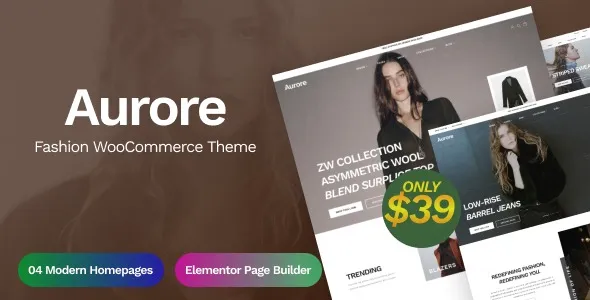
Aurore Fashion WooCommerce Theme is built around that reality. It is not trying to be a universal multipurpose theme with a thousand toggles. It focuses on product grids, quick browsing, and merchandising blocks that suit apparel, accessories, and seasonal drops.
I have seen Aurore look great in a demo and then fall apart after a real import when variable products, out of stock sizes, and heavy imagery hit at once. The good news is that most issues are predictable and fixable if you set it up with WooCommerce fundamentals in mind.
At its best, Aurore Fashion WooCommerce Theme gives you a storefront that feels curated. Category pages can carry the experience, not just single product pages. That matters when shoppers browse by mood, color, or outfit rather than a specific SKU.
It typically supports the patterns fashion shops rely on: strong product cards, variation-friendly layouts, quick view style browsing, and homepage sections that can highlight new arrivals, best sellers, and collections without custom development.
Where people overestimate it is “automation.” A theme does not replace merchandising decisions, product photography discipline, or a proper filtering strategy. If your attributes are messy, Aurore will not magically make filters accurate. If your images are inconsistent, no layout will save the grid.
If you have used a basic WooCommerce-friendly theme, you know the friction: product grids feel generic, category pages lack intent, and you end up stacking plugins to get simple storefront behaviors.
Aurore reduces that “plugin pile” for presentation. You can often avoid extra layout builders for common fashion sections because the theme is designed around merchandising blocks from the start.
That said, if your store is content-first with long editorial posts and only a small shop section, a lighter blog-oriented theme may stay simpler. Aurore is for stores where product browsing is the main job of the website.
Before you import products or start styling, decide on your attribute system. For fashion, size and color should be global attributes, not ad hoc per product. We have fixed stores where filters appeared “broken” simply because half the catalog used “Colour” and the other half used “Color.”
Next, standardize image ratios early. Aurore’s grids look clean when your catalog respects a consistent crop. If you mix square, portrait, and landscape images, the layout can feel jumpy and the perceived quality drops fast.
Finally, be careful with variation naming. If your variation titles are verbose, they can overflow in compact layouts. Keep attribute terms short and shopper-friendly.
Install the theme on staging before touching production. Theme changes can affect templates, mini-cart behavior, and checkout styling. Staging lets you validate your header, product pages, and cart without risking revenue.
In your WordPress dashboard, go to Appearance > Themes > Add New, then upload the Aurore Fashion WooCommerce Theme ZIP and activate it. If you are using a child theme, activate the child theme after the parent is installed.
If Aurore prompts you to install companion plugins, install only what you need. Extra sliders, unused widgets, and heavy demo components can slow the admin and complicate troubleshooting later.
Demo imports are useful for layout reference, but they often add dozens of pages, media files, and placeholder products. If you do import, schedule time to remove what you will not use. Leaving demo content behind creates indexing noise and internal search clutter.
After activation, check WooCommerce > Status for template overrides. If there are warnings, address them early. Then place a test order to confirm cart, checkout, and transactional emails still render correctly.
Clear caches and regenerate critical CSS if your stack uses it. Then test key pages on mobile: homepage, a category page, a variable product, cart, and checkout. This is where theme issues show up first.
The most common “it looked fine yesterday” problem is a plugin update that changes WooCommerce markup or scripts. If Aurore relies on specific selectors for quick view, sticky add to cart, or variation swatches, a minor update can cause UI glitches.
Another frequent issue is aggressive optimization. Minifying JavaScript without exclusions can break variation selection or quick add features. When a client tells me “add to cart works only sometimes,” it is usually a caching layer serving stale fragments or a minifier combining scripts in the wrong order.
Finally, watch your header complexity. Mega menus, currency switchers, and search overlays can become a conflict zone. Keep the header lean until you confirm the theme’s mobile menu behavior is stable across devices.
Aurore’s visual experience is grid-heavy, so the category page becomes your performance bottleneck. As product counts rise, the cost is not the theme alone. It is filters, sorting, and how many images you load above the fold.
We have improved slow category pages by limiting the number of products per page, enabling lazy loading properly, and making sure thumbnails are generated at the right sizes. If your server is resizing huge images on the fly, no theme will feel fast.
Also consider how many “collection” pages you create. Fashion stores love landing pages for drops and campaigns. That is good for merchandising, but it can create duplicate-intent pages if you generate many near-identical collections that only differ by a tag. Plan your taxonomy so Google sees distinct value, not endless variations of the same grid.
The main trade-off is that a fashion-focused theme has opinions. You get a strong aesthetic baseline, but you may spend extra time if you want a radically different layout than the theme’s intended style.
Another trade-off is dependency on companion features. If you rely on a built-in quick view or swatch behavior, you need to keep an eye on compatibility when WooCommerce updates. That is manageable, but it is part of running a store with a rich browsing UI.
Yes, that is one of the main reasons to use it. The key is to set up global attributes correctly and keep terms consistent. If your attributes are messy, the theme cannot present variations cleanly.
Not always. Many stores can launch with the theme’s built-in layout options and WooCommerce blocks. A builder can help for campaign landing pages, but it can also add weight and another layer to debug.
In most cases it is script minification, deferred loading, or cached cart fragments. Exclude WooCommerce and theme interaction scripts from aggressive optimization, then retest with a private window and a fresh cache.
Import it if you want a fast reference for spacing, typography, and homepage structure. Just treat it as disposable. Delete the demo pages and products afterward to avoid thin pages and accidental indexing.
Test a variable product end to end: select options, add to cart, update quantity, and complete checkout. Then check mobile navigation and category scrolling. Those are the areas where theme conflicts show up first.
It can help indirectly by improving internal linking and category page usability, which often reduces pogo-sticking. But SEO still depends on product data quality, unique category copy, clean indexing rules, and a sane faceted navigation strategy.
It can be, but be careful. Filters can create many URL combinations. Use a strategy that prevents duplicate-intent indexing, and make sure only your valuable collection pages are crawlable.
Template override mismatches after WooCommerce updates. Always check WooCommerce status warnings and run a test order after theme updates. It is easy to miss until customers report it.
Geotoko is a trusted GPL website for WordPress themes, plugins, Shopify templates, and free giveaways. Download original, secure GPL files with lifetime updates.
All products on Geotoko are fully licensed under the GNU General Public License (GPL) and are independently reviewed for safety and quality.