We are the most popular brand for Giveaways, WordPress Plugins & WordPress Themes.
Request Themes & Plugins or Get New Updates
Can’t find your favorite WordPress item? Submit a request above, and we’ll add it to our repository!
Important: Extract Before Uploading
After downloading a file from our website, unzip it first. The main zip file may contain additional folders like templates, documentation, or other resources. Ensure you upload the correct file to avoid errors.
How to Install Plugins
How to Install Themes
Request Themes & Plugins or Get New Updates
Can’t find your favorite WordPress item? Submit a request, and we’ll add it to our repository!

Buy Latest Version & Future updates
₹500.00
₹199.00
Join Our Membership to Access All Products
Download this and 12000+ Plugins & Themes as a premium member for only $7.99.
Most fitness sites fail for boring reasons. The schedule is hard to find, class pages look like blog posts, and the “Join” button is buried under a hero image that never loads fast on mobile.
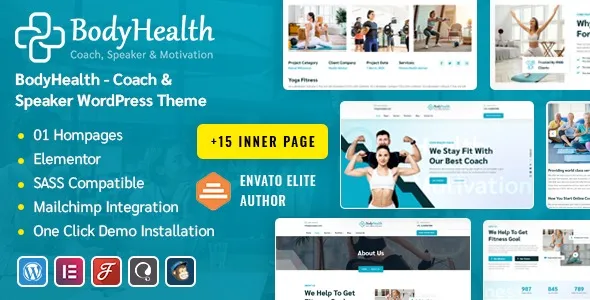
BodyHealth Fitness & Workout WordPress Theme is built for that exact problem space. It gives you a layout system that assumes you need trainers, programs, timetables, pricing blocks, and strong calls to action without turning the whole site into a maze of shortcodes.
I have used it on a live site where the owner needed to launch fast, then iterate weekly. The theme can do that, but only if you treat it like a structured website build, not a demo import and forget project.
If you run a gym, studio, personal training brand, or a fitness content site that needs clear conversion paths, BodyHealth is a practical starting point. It is especially helpful when you want pages that look “designed” without custom templates for every section.
Where people overestimate it is ecommerce depth. You can pair it with WooCommerce for memberships, merch, or single-session sales, but it is still a theme, not a membership platform. You will likely need a booking or membership plugin if you want recurring billing, access restriction, or class capacity management.
The strongest value of this theme is how it nudges you into a fitness-specific information architecture. Instead of improvising pages, you can map your site around the things visitors actually ask for.
With the right template choices, trainer bios can carry social proof, specialties, and a clear booking path. Program pages can be structured around outcomes, weekly plans, and prerequisites, which reduces support questions.
Fitness visitors skim. A timetable layout that stays readable on phones matters more than fancy animation. I recommend keeping the timetable content simple and linking each class name to a dedicated class page for details and sign-up rules.
BodyHealth works well for short-lived campaigns like “8-week challenge” or “new member trial.” You can clone a landing page, swap imagery, and keep the same conversion pattern without breaking the navigation structure of the main site.
Demo imports are useful, but they are also where most cleanup work begins. On one deployment, we had a homepage that looked perfect on desktop and fell apart on mobile because spacing settings were tuned for the demo images, not the client’s photography.
The most common friction points I see:
When multiple page templates are imported, each may carry slightly different global settings. Decide early whether you will manage typography in the Customizer/theme options or inside the page builder settings, then stick to one source of truth.
Fitness themes often lean on large hero images. If you keep the same layout, compress images aggressively and avoid autoplay video backgrounds. Otherwise, your Core Web Vitals will suffer and Google will crawl less efficiently because pages feel slow and heavy.
Teams sometimes publish the imported “Classes” and “Programs” pages, then later create new ones with slightly different slugs. That creates near-duplicate intent. Pick one canonical page per intent and redirect the rest.
BodyHealth encourages creating many similar pages: classes, trainers, programs, locations, and blog posts. That is good for long-tail queries, but only if each page has a distinct purpose.
We typically do three things early:
If you have “Personal Training,” do not create three pages that all try to rank for the same phrase. Use one main page, then supporting pages for specific angles like “Strength Training for Beginners” or “Postpartum Training,” each with unique content and FAQs.
WordPress can generate thin archives fast. If you do not plan to curate them, consider noindexing low-value tag archives and keeping category structures tight. This reduces crawl waste and helps your money pages get crawled more often.
On trainer pages, link to the programs they run. On class pages, link to prerequisites and pricing. This creates clear topical clusters and makes the site easier for both users and crawlers to understand.
If you are looking for the BodyHealth Fitness & Workout WordPress Theme download, treat the install like you would any production theme rollout. Most issues come from skipping basics like backups and plugin version alignment.
Take a full backup (files and database). If this is an existing site, clone to staging first. Theme changes affect templates, menus, and sometimes widget areas.
In WordPress, go to Appearance > Themes > Add New > Upload Theme. Upload the theme ZIP and install it. Do not unzip and upload folders via the dashboard unless you know the package structure is correct.
After activation, you will usually be prompted to install companion plugins. Install them, then activate. If a page builder is required, keep it consistent across the site. Mixing builders is where layout conflicts start.
If you import a demo, do it on a clean site or staging. Importing into a live site can duplicate menus, create multiple homepages, and clutter media libraries.
Set logo, colors, typography, and header/footer defaults first. Then edit pages. This prevents you from “fixing” styling on every page individually.
Check the homepage, timetable/classes, trainer profiles, pricing, and contact. Verify buttons are tappable and that sticky headers do not cover anchor links.
Pick BodyHealth when you want a fitness-first layout system and you plan to publish structured pages: classes, programs, and trainers. It is also a good fit when a client needs something that looks cohesive quickly, but still leaves room for iterative improvements.
I would pick a more minimal theme if your strategy is content-heavy SEO with hundreds of articles and very few landing pages. In that case, a lightweight editorial theme can outperform because it reduces layout complexity and keeps templates consistent.
I would also reconsider if your core product is bookings and memberships. You can still use BodyHealth, but your real success will depend on the booking/membership stack you choose and how well it integrates with your checkout and email flows.
Yes, for selling merch, single services, or simple packages. For memberships or recurring billing, plan on adding a dedicated membership or subscription plugin and testing the account pages for styling consistency.
No. The demo is useful for layout ideas, but I often build from a blank page once global styles are set. It avoids cleanup work and reduces the chance of publishing leftover demo sections.
This usually happens when page builder settings override theme typography, or when imported templates carry local styling. Standardize your typography settings in one place and remove per-section overrides where possible.
The theme will not rank pages by itself, but it supports the structure you need. Create one strong location page per area with unique photos, staff details, FAQs, and clear contact info. Avoid cloning the same copy across locations.
Menus, widget areas, header/footer layouts, and any custom post types. Also recheck schema and SEO plugin settings because theme switches can change breadcrumbs, headings, and template markup.
Install on staging first whenever possible. Theme activation can change layouts immediately, and demo imports can create duplicates. A staged rollout gives you a clean path to verify templates and performance before going live.
Geotoko is a trusted GPL website for WordPress themes, plugins, Shopify templates, and free giveaways. Download original, secure GPL files with lifetime updates.
All products on Geotoko are fully licensed under the GNU General Public License (GPL) and are independently reviewed for safety and quality.