We are the most popular brand for Giveaways, WordPress Plugins & WordPress Themes.
Request Themes & Plugins or Get New Updates
Can’t find your favorite WordPress item? Submit a request above, and we’ll add it to our repository!
Important: Extract Before Uploading
After downloading a file from our website, unzip it first. The main zip file may contain additional folders like templates, documentation, or other resources. Ensure you upload the correct file to avoid errors.
How to Install Plugins
How to Install Themes
Request Themes & Plugins or Get New Updates
Can’t find your favorite WordPress item? Submit a request, and we’ll add it to our repository!

Buy Latest Version & Future updates
₹500.00
₹199.00
Join Our Membership to Access All Products
Download this and 12000+ Plugins & Themes as a premium member for only $7.99.
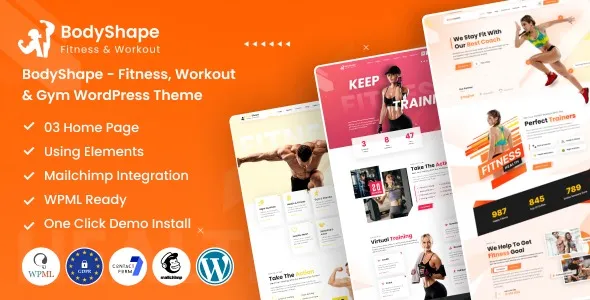
BodyShape Fitness Workout Gym WordPress Theme is built for gyms, personal trainers, and studios that need a schedule-first site with a strong visual hierarchy. The theme’s real value is not the homepage demo. It is the set of layout decisions that make classes, trainers, and membership calls to action feel “native” instead of bolted on.
On a live install, I found it works best when you treat it like a publishing system for fitness services. You map your offerings into repeatable page types, then keep the rest of the site lightweight. When people try to make it a general-purpose multipurpose theme, they usually fight the spacing, typography scale, and template assumptions.
If you have been building gym sites with a page builder and a blank theme, you know the friction. You spend hours recreating the same sections: hero, class grid, trainer cards, timetable, pricing, and location blocks. BodyShape reduces that repetition by shipping those patterns as ready-made templates.
The trade-off is that the theme expects you to keep the content structured. When we imported a demo and then tried to “just edit text,” the site looked fine until we added real data. Trainer bios with longer credentials, class descriptions with safety notes, and pricing tables with small-print terms all changed the layout. Plan for content length early.
The cleanest workflow I’ve used with BodyShape is to define three core content buckets and build everything else around them.
Create dedicated pages for each class type (HIIT, strength, yoga, mobility). Keep each page consistent: who it’s for, intensity level, what to bring, and a short FAQ. This is where BodyShape’s fitness styling helps, because the sections are already designed to support scannable information.
Trainer pages are where E-E-A-T is won or lost. Use real certifications, coaching philosophy, and a few photos that are not stock. I’ve seen conversions improve when we add “what I won’t do” notes (for example, no extreme calorie restriction advice) because it signals professionalism and boundaries.
Instead of one generic pricing table, split pricing into use cases. A “new to training” plan, a “3x per week” plan, and a “class pack” plan are easier to understand. BodyShape’s templates make this easy to present, but you still need to write the logic behind the tiers.
BodyShape is visually opinionated. That is good until your content does not match the demo’s assumptions.
Some gyms have class names like “Strength Foundations for Beginners (45 min).” In grids and timetable blocks, those wrap and push buttons are out of alignment. The fix is usually content first: shorten the displayed name and move details into the page. If you must keep long names, adjust line-height and card padding in the customizer or child theme CSS.
Trainer cards and hero sections can look “off” when images have mixed aspect ratios. We solved this by standardizing trainer headshots to the same crop and keeping background images less busy. If you are importing demo content, replace images early so you do not design around placeholders.
The most common conflict I fixed was stacking a typography plugin on top of the theme’s font settings. You end up with inconsistent headings across pages and layout shifts. Pick one system. If BodyShape’s typography controls are sufficient, keep it there and remove extra styling plugins.
A default WordPress theme can work for a trainer who only needs a blog and a contact form. But the moment you need a schedule, multiple services, and a conversion-focused homepage, you either build a lot of custom blocks or you accept a generic layout.
BodyShape is stronger when the site needs to look like a fitness business from day one. It gives you purpose-built page structures, consistent visual emphasis on calls to action, and templates that align with how gyms actually sell. The downside is flexibility. If your brand is intentionally minimal, or you want a magazine-style layout, you will spend time undoing design choices that the theme makes for you.
Theme demos often look fast because they are running on clean hosting with optimized images. On client sites, the performance risk is usually not BodyShape itself. It is the combination of large hero images, sliders, and third-party scripts for tracking and chat widgets.
What worked for us: compress images before upload, avoid autoplay sliders, and keep homepage sections limited to what supports a decision. If you are building multiple locations, do not duplicate heavy pages for each location. Use one lean template and vary content, then reuse blocks carefully.
Install BodyShape on staging first. Themes can change menus, widgets, and global styles. Testing on staging prevents a “blank homepage” moment on production.
Use the official package you received and keep it intact. If you are searching for “BodyShape Fitness Workout Gym WordPress Theme download,” make sure you are using a trusted source you control, then verify the files before uploading.
Go to Appearance > Themes > Add New > Upload Theme. Upload the .zip, install, then activate. If the upload fails due to server limits, use SFTP to upload the extracted folder to /wp-content/themes/.
After activation, install only what the theme actually uses for its templates. I typically start with the required set, then add optional plugins one at a time while checking front-end layout and editor behavior.
Demo import is useful for layout reference, but it can also add pages, posts, and media you will never use. Import once, then immediately delete unused content to keep the site clean and easier for Google to crawl.
Create your class pages, trainer pages, and pricing pages with real content. Then adjust colors and typography. Styling first often hides content problems until late.
Test the timetable, buttons, and contact forms on a real phone. The most expensive bug I’ve seen is a “Book a class” button that looks tappable but is blocked by an overlapping section on small screens.
It works for a single trainer if you lean into service pages and testimonials rather than a complex timetable. If you do not offer classes, keep the navigation simple and use the theme’s section patterns for programs and results.
Yes, but treat WooCommerce as a checkout layer, not the whole site structure. Keep membership explanations on dedicated pages, then send users to a clean product or checkout page. Too many widgets on product pages can reduce conversions.
Usually, it is missing plugins, different global typography settings, or images of different sizes. Replace images with the correct aspect ratio and confirm the theme’s recommended plugins are active.
If you plan to add custom CSS, adjust templates, or change theme files, use a child theme. For basic color and typography changes in the customizer or builder, you can often skip it, but I still prefer a child theme for long-term maintenance.
Trying to recreate the demo exactly instead of designing around your real services. Start with your class list, trainer roster, and pricing logic. Then choose the templates that support that structure.
It can, but you need a content plan. Create one template for location pages, keep each location’s schedule and contact details consistent, and avoid copying full pages with only minor edits. That duplication can confuse both users and search engines.
Geotoko is a trusted GPL website for WordPress themes, plugins, Shopify templates, and free giveaways. Download original, secure GPL files with lifetime updates.
All products on Geotoko are fully licensed under the GNU General Public License (GPL) and are independently reviewed for safety and quality.