We are the most popular brand for Giveaways, WordPress Plugins & WordPress Themes.
Request Themes & Plugins or Get New Updates
Can’t find your favorite WordPress item? Submit a request above, and we’ll add it to our repository!
Important: Extract Before Uploading
After downloading a file from our website, unzip it first. The main zip file may contain additional folders like templates, documentation, or other resources. Ensure you upload the correct file to avoid errors.
How to Install Plugins
How to Install Themes
Request Themes & Plugins or Get New Updates
Can’t find your favorite WordPress item? Submit a request, and we’ll add it to our repository!

Buy Latest Version & Future updates
₹800.00
₹399.00
Join Our Membership to Access All Products
Download this and 12000+ Plugins & Themes as a premium member for only $7.99.
If you run a venue site for bowling, billiards, mini-golf, or a mixed entertainment center, the hard part is rarely “having a website.” The friction is in getting hours, pricing, party packages, leagues, events, and photo-heavy pages to feel coherent on mobile, while still being easy to update by staff.
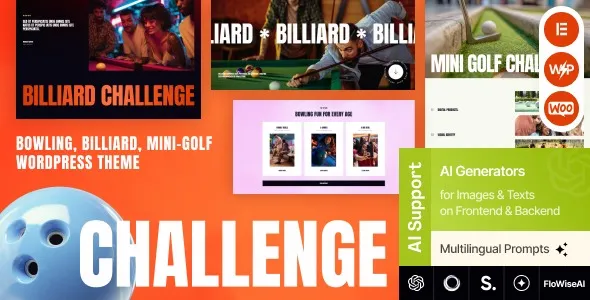
The Challenge Bowling, Billiard & Mini-Golf WordPress Theme download is built around that venue reality. It gives you a visual structure for promotions, booking prompts, and service pages that do not look like a blog pretending to be a business site.
I have seen this theme work best when the business owner wants a polished layout quickly, but still needs WordPress editing to stay simple enough that updates do not become a monthly support ticket.
Most entertainment venue sites fail in three places: inconsistent calls to action, messy navigation across activities, and slow pages caused by oversized images and sliders.
Challenge tends to steer you into a clearer page hierarchy. You can separate each activity into its own landing page, then route users into parties, pricing, and booking from there. That structure matters for SEO because it avoids “duplicate intent” pages where three URLs all try to rank for the same “birthday party” query.
One practical note from live use: the homepage layouts look great, but it is easy to over-stack sections. If you add every block, you will bury the booking action and hurt Core Web Vitals. Keep the hero, one promo strip, and one services grid. Let the rest live on dedicated pages.
This theme makes it tempting to create multiple similar pages because the templates look good. Resist that. Decide early which page is the “primary” for each intent.
A clean mapping I have used:
Bowling page targets “bowling” and “bowling prices.” Mini-golf page targets “mini golf” and “mini golf hours.” A single Parties page targets “kids birthday party” and “group events,” with sections for each activity instead of separate party pages that repeat the same content.
If you need separate party pages, make them truly different. Use unique package names, different inclusions, different photos, and different FAQs. Otherwise, you end up with near-duplicates that compete with each other and dilute crawl priority.
If you are looking for the Challenge Bowling, Billiard & Mini-Golf WordPress Theme download, treat the install like a production change. Themes can affect menus, widgets, and page builder content in ways that are annoying to unwind.
1) Take a backup and note your current theme settings. Save your current customizer settings and export any page builder templates if your site uses them.
2) Upload the theme ZIP in WordPress. Go to Appearance, Themes, Add New, Upload Theme. Install and activate.
3) Install required and recommended plugins. Most venue themes rely on a small stack for page layouts, sliders, or galleries. Install only what you need for the layouts you will actually use.
4) Import demo content cautiously. If you are working on a new site, demo import can speed things up. On an existing site, import into a staging environment first. Demo imports often create extra pages that later get indexed if you forget to delete them.
5) Set permalinks and basic SEO defaults. Use a clean permalink structure and ensure only one version of each page is indexable. Check that tag archives and author archives are not accidentally indexed if they add thin pages.
6) Validate mobile layout and header behavior. I always test the header on iPhone-sized screens first. Venue sites live or die on tap targets for “Book,” “Call,” and “Directions.”
7) Run a quick crawl and fix obvious duplication. After activation, crawl the site and look for demo pages, duplicate activity pages, and parameter URLs created by galleries.
I usually reduce the number of homepage sections, replace any autoplay slider with a static hero, and compress all hero images. If the theme includes a heavy gallery on the homepage, moving it to an internal page often improves load time without hurting conversions.
Then I set up a clear menu: Activities, Parties, Leagues, Events, Contact. Anything else becomes a footer link. This keeps navigation predictable and helps Google understand the site structure.
The best use of Challenge is to treat it as a set of repeatable page patterns. You want staff to update hours and specials without breaking layout.
For activity pages, I recommend a simple sequence: short intro, pricing table or cards, hours, rules or what to bring, then a booking or contact block. Keep “about the venue” content off these pages. Put it on an About page so you do not dilute intent.
For events, do not create a new page for every weekly event unless you will maintain it. Instead, create one Events page and list recurring events inside it. If you need individual event pages for SEO, make sure each one has unique details, photos, and FAQs. Otherwise, you create thin pages that get crawled but do not rank.
Bowling and mini-golf sites are image heavy. The theme layouts encourage it, which is fine, but the implementation matters. I have seen pages hit 8 to 12 MB because uploads were not resized.
Use consistent image dimensions, compress aggressively, and avoid loading multiple full-width images above the fold. If the theme offers multiple gallery styles, pick one and standardize it site-wide. That consistency helps both UX and long-term editing.
Could you build the same site with a default block theme and a few patterns? Yes, but you will spend time designing sections that this theme already has. The real difference is speed to a coherent venue layout.
Where Challenge tends to win is in the “first impression” pages: activity landing pages, promotions, and hero sections that look like an entertainment business rather than a corporate brochure.
Where a generic approach can win is long-term simplicity. If your team wants the lightest possible stack and you are comfortable designing block patterns, a lean block theme can be easier to maintain. With Challenge, you are buying into its layout system, which is great until you want to rebuild everything with a different editor.
On a real deployment, the main risk was overbuilding. The theme makes it easy to add more sections, more icons, more sliders. That can make the site feel busy and can slow it down.
Another trade-off is content portability. If you rely heavily on the theme’s bundled layout tools, switching themes later may require rebuilding pages. If you know a redesign is likely within a year, keep your content in clean blocks and avoid overly custom modules.
Finally, be careful with demo content. It is common to import everything, then forget to remove placeholder pages. Those pages sometimes get indexed, creating thin content and confusing search intent.
Yes, but plan your structure. Use one main brand site with dedicated location pages, each with unique hours, pricing notes, and photos. Avoid cloning the same content across locations, or you will create duplicate intent pages that compete in local search.
You can. In practice, I often install the theme, then recreate only the needed page layouts. Demo import is fastest for new builds, but it can add cleanup work if you are migrating an existing site.
Check mobile header behavior, compress your hero images, and review which pages are set to index. Then delete any unused demo pages and make sure your main activity pages each have a distinct purpose.
The theme can present booking calls to action well, but booking functionality depends on the booking tool you use. Treat the theme as the front-end presentation layer and keep booking logic in a dedicated plugin or external booking system.
Start with one strong Leagues page and one strong Events page. Only create separate pages when you have enough unique details to justify them, such as schedules, rules, prize structures, or photo galleries that are specific to that league or event.
It can if you use heavy sliders, large images, and too many homepage sections. With sensible image sizing and a restrained layout, I have seen it perform well enough for venue sites. The biggest gains usually come from image optimization and reducing above-the-fold assets.
Challenge is a good choice when you want a venue-specific look quickly and you plan to keep the site structure stable for a while. It is especially useful for businesses that need clear activity pages and strong party package presentation.
If your priority is maximum long-term portability with minimal theme dependence, you may prefer a simpler block-based approach. But if you want a ready-made layout system that matches bowling, billiards, and mini-golf businesses, the Challenge Bowling, Billiard & Mini-Golf WordPress Theme is a practical starting point that can be made search-friendly with disciplined page intent and careful media handling.
Geotoko is a trusted GPL website for WordPress themes, plugins, Shopify templates, and free giveaways. Download original, secure GPL files with lifetime updates.
All products on Geotoko are fully licensed under the GNU General Public License (GPL) and are independently reviewed for safety and quality.