We are the most popular brand for Giveaways, WordPress Plugins & WordPress Themes.
Request Themes & Plugins or Get New Updates
Can’t find your favorite WordPress item? Submit a request above, and we’ll add it to our repository!
Important: Extract Before Uploading
After downloading a file from our website, unzip it first. The main zip file may contain additional folders like templates, documentation, or other resources. Ensure you upload the correct file to avoid errors.
How to Install Plugins
How to Install Themes
Request Themes & Plugins or Get New Updates
Can’t find your favorite WordPress item? Submit a request, and we’ll add it to our repository!

Buy Latest Version & Future updates
₹500.00
₹199.00
Join Our Membership to Access All Products
Download this and 12000+ Plugins & Themes as a premium member for only $7.99.
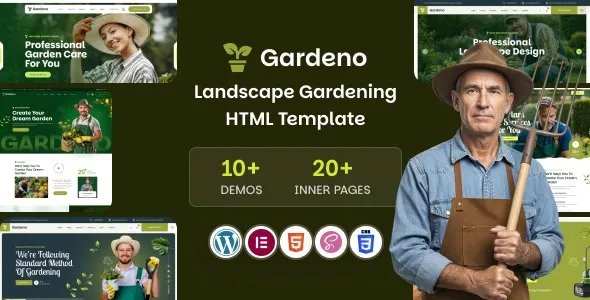
Most gardening and landscaping sites fail for boring reasons. The gallery is slow, the service pages all look the same, and the “request a quote” flow is either hidden or broken on mobile. Gardeno Gardening and Landscaping WordPress Theme is built around those realities. It is not just a pretty homepage. It is a set of page patterns that make it easier to publish service-led content, show before-and-after work, and funnel visitors into a contact or booking action without fighting your theme every week.
I have deployed Gardeno on a live site where the owner updated projects weekly. The theme held up well once we made a few decisions early, especially around image sizing, header behavior, and how we structured service pages so Google did not treat them as near-duplicates.
The best use case for Gardeno is a business that sells outcomes, not products. Think lawn care, garden design, irrigation installs, patio builds, or seasonal maintenance plans. You need repeatable page layouts that still allow unique content per service area and per service type.
Gardeno’s layout approach makes it easier to keep a consistent visual system while varying the content blocks enough to avoid “same page, different city” syndrome. We used one core service template, then swapped the proof elements per page: different project photos, different FAQs, different “process” steps, and different local trust signals.
If you publish project pages, the theme’s portfolio-style sections are useful because they encourage a narrative: problem, scope, materials, timeline, result. That structure tends to index better than pure image galleries, and it gives you internal linking opportunities back to service pages.
Before you touch colors or fonts, decide how you will separate “services” from “projects” from “locations.” Gardeno can visually support all three, but your site architecture still matters.
On one build, the client started adding every project as a service page because it “looked nicer.” That created duplicate intent and confused navigation. We fixed it by treating services as evergreen pages, projects as proof pages, and locations as modifiers only when there was real local differentiation.
Also decide your primary conversion action. If it is a quote request, make it consistent. The theme makes it tempting to add multiple CTAs. Too many buttons can reduce actual leads, especially on mobile.
For most landscapers, a simple hierarchy works:
Service pages target “what you do” queries. Project pages target “proof and inspiration” queries. Blog posts target seasonal advice and long-tail questions. Gardeno’s design supports that split, but you still have to write for it.
The most common friction is not “installation.” It is getting the demo content out of the way without breaking spacing and typography. Gardeno’s demo layouts can be dense, and if you delete sections blindly you end up with awkward gaps or inconsistent headings.
What worked for us was replacing section-by-section rather than deleting. Swap the demo text with your own first. Then remove blocks only after you have a complete page. This keeps your layout stable and prevents last-minute “why is this section floating” issues.
Another recurring issue is image weight. Gardening sites love big photos. If you upload 4000px images everywhere, the theme will still look good, but Core Web Vitals will not. We standardized on a few image sizes and used consistent cropping for project grids.
On one site, the sticky header overlapped anchor links on mobile. It was not a deal-breaker, but it made “jump to pricing” links feel broken. The fix was simple: adjust offset or reduce header height, depending on your builder settings. Test anchor links on an actual phone, not just responsive mode.
You can build a landscaping site on any flexible theme, but you often spend time inventing patterns that Gardeno already assumes. The difference shows up when you need five service pages that feel consistent, plus a dozen projects, plus seasonal content.
With a generic theme, you usually end up with either a cookie-cutter look or a patchwork of page-builder experiments. Gardeno is opinionated in a helpful way. It nudges you toward the sections that landscaping buyers expect: service highlights, process steps, trust elements, and image-led proof.
That said, if your business is mostly eCommerce (selling plants, tools, or subscriptions), you may be better served by a shop-first theme. Gardeno can support WooCommerce, but its core strength is service presentation and lead capture, not product catalog UX.
Gardeno makes it easy to replicate pages, which is both a strength and a risk. If you clone a service page ten times and only change the city name, you will create pages that compete with each other. Google usually picks one and ignores the rest, or indexes them weakly.
When we scaled a site with multiple service areas, we used a simple rule. Each location page needed something real: different project examples from that area, different testimonials, and at least one section that addressed local constraints (soil type, typical yard sizes, HOA rules, seasonal weather). Without that, we did not publish the page.
If you plan to grow content, set up internal linking early. Link project pages to the specific service performed, not just to the homepage. Gardeno’s visual blocks make these links easy to place without looking spammy.
Update WordPress, your PHP version, and core plugins before installing the theme. If you are migrating from another theme, take a backup and note any custom CSS or header scripts you need to carry over.
Keep the theme ZIP intact. If your download includes multiple ZIPs (theme plus bundled components), do not upload the whole package at once. Upload the theme ZIP that contains the actual theme folder.
In WordPress, go to Appearance, then Themes, then Add New, then Upload Theme. Upload the ZIP and activate it. If you hit an upload limit, increase your server upload size or install via SFTP.
After activation, install the recommended plugins from the theme prompt. If you choose to import demo content, do it on a clean site first. Demo imports can overwrite menus, homepage settings, and widget areas, so confirm what will change before you click import.
Swap images and text first, then remove unwanted sections. Re-check mobile layouts after each major page edit. This is where most “the theme is broken” reports come from, when it is really missing content or spacing from deleted blocks.
Test your contact forms, quote buttons, and click-to-call links. Check page speed on a few image-heavy pages. Then request indexing for your core service pages once they are unique and complete.
It works well for solo operators if you keep the site tight. Start with a homepage, 3 to 5 service pages, a projects page, and a contact page. The theme can look “busy” if you try to use every section on every page.
Yes, but expect more manual layout work. The demo import is useful as a reference for spacing, typography, and section order. What we often do is import, build the real pages, then delete the demo pages once the structure is stable.
Usually it is missing plugins, missing demo settings, or different global typography settings. Confirm the required plugins are active, then check your theme options and page-builder global styles. Also verify the homepage assignment in Settings under Reading.
It can be, but the theme will not solve duplicate content. You need unique copy, unique proof, and a clear internal linking plan. If you cannot produce differentiated content per area, publish fewer pages and make them stronger.
Use consistent image dimensions, compress uploads, and avoid uploading camera originals. On one site, simply standardizing featured images and enabling modern formats cut load times noticeably without changing the design.
If your site is mostly a blog, or mostly a product catalog, you may not benefit from the service-first layouts. In those cases, a content-first or shop-first theme can reduce the amount of layout adjustment you will do.
Geotoko is a trusted GPL website for WordPress themes, plugins, Shopify templates, and free giveaways. Download original, secure GPL files with lifetime updates.
All products on Geotoko are fully licensed under the GNU General Public License (GPL) and are independently reviewed for safety and quality.