We are the most popular brand for Giveaways, WordPress Plugins & WordPress Themes.
Request Themes & Plugins or Get New Updates
Can’t find your favorite WordPress item? Submit a request above, and we’ll add it to our repository!
Important: Extract Before Uploading
After downloading a file from our website, unzip it first. The main zip file may contain additional folders like templates, documentation, or other resources. Ensure you upload the correct file to avoid errors.
How to Install Plugins
How to Install Themes
Request Themes & Plugins or Get New Updates
Can’t find your favorite WordPress item? Submit a request, and we’ll add it to our repository!

Buy Latest Version & Future updates
₹500.00
₹199.00
Join Our Membership to Access All Products
Download this and 12000+ Plugins & Themes as a premium member for only $7.99.
Magazine and newspaper layouts look simple until you try to ship one on WordPress without turning the homepage into a fragile stack of widgets and shortcodes. I have seen teams start with a clean blog theme, then bolt on category grids, trending blocks, ad slots, author boxes, and a “featured story” hero. A month later, nobody wants to touch the layout because one small change breaks three sections.
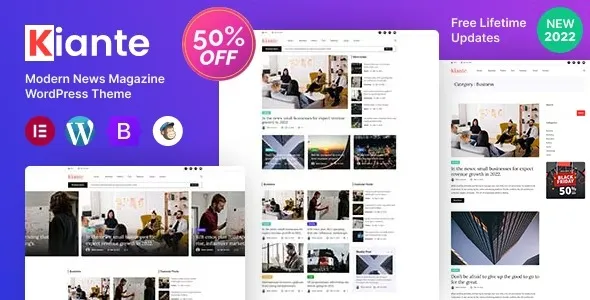
Kiante Newspaper Magazine Blog Modern WordPress Theme Multipurpose is built for that exact moment. It is a theme that assumes you will publish frequently, organize content by sections, and need consistent templates for posts, categories, and editorial blocks. It is not just “a blog skin”. It is a layout system aimed at publication-style sites.
In practice, Kiante is most valuable when you need repeatable editorial structure. Think featured post areas, multiple post grids, category-based sections, and a readable single-post template that can carry long articles without feeling like a wall of text.
Where people overestimate it is ecommerce and complex membership logic. You can run WooCommerce on top of it, but Kiante is not a store-first theme. If your revenue depends on product listing UX, filters, and conversion-focused templates, you will still do more work than with a shop-focused theme.
What I like in magazine themes is when typography and spacing are treated as first-class. Kiante’s value is less about “more demos” and more about giving you an editorial baseline you can customize without rebuilding every template from scratch.
Most teams get the best results when they treat the homepage as a set of predictable modules rather than a one-off design. We typically start by mapping content types and cadence, then matching sections to categories or tags.
A common workflow is to reserve the top for a featured story and two to four secondary items, then use category blocks below. This keeps the layout stable even when editors publish 20 posts in a day. The homepage updates through content selection, not layout changes.
Instead of letting WordPress category archives look like generic lists, we treat each category as a section front. Kiante’s magazine styling makes that feel intentional, and it reduces the temptation to build separate landing pages for every section.
On content-heavy sites, the single post template matters more than the homepage. We usually test readability with a 2,000-word article, multiple headings, images, and embeds. If the theme holds up there, the rest is easy.
I have broken more magazine homepages than I want to admit, mostly by stacking too many dynamic blocks that query posts in slightly different ways. The site still “works”, but the server load climbs and the editor experience slows down.
With Kiante, the risk is not unique to the theme. It is the magazine pattern itself. Lots of grids, lots of queries, and lots of images above the fold. If you are chasing Core Web Vitals, you have to be intentional.
I look at how many post queries are running on the homepage, whether images are properly sized, and whether the theme’s scripts are loading site-wide or only where needed. If you combine a heavy homepage with an aggressive page builder setup, you can end up caching your way out of a problem you created in the first place.
We typically pair a magazine theme with solid caching and image optimization, then keep the number of homepage sections reasonable. It is better to have six strong sections than twelve cramped ones.
If you try to build a newspaper layout with the block editor alone, you can do it, but maintenance becomes the hidden cost. Editors start duplicating patterns, spacing drifts, and category pages remain neglected because the “real design” lives only on the homepage.
Kiante gives you a cohesive editorial look across the site. That matters for crawl prioritization too. When your archives, categories, and post templates are consistent and readable, Google has an easier time understanding the site structure. It also reduces duplicate-intent issues where multiple pages end up competing for the same topic because navigation and internal linking are unclear.
Compared with generic multipurpose themes, Kiante is more opinionated about publication layout. That is a benefit if you want a news or magazine feel. It is a limitation if you want a blank canvas for a corporate site.
Install WordPress on staging and confirm your PHP version and memory limits are reasonable. Magazine demos can be media-heavy, and importing on a tiny server often fails halfway through.
If you are looking for “Kiante Newspaper Magazine Blog Modern WordPress Theme Multipurpose download”, treat it like any theme file you plan to run in production. Keep the original zip intact so you can re-upload if an import goes wrong.
In WordPress, go to Appearance, Themes, Add New, Upload Theme. Upload the zip, install, then activate. If the theme prompts for companion plugins, install them, but do it in batches so you can identify which plugin causes issues if something conflicts.
Demo import is useful for layout scaffolding, but it can also create a mess of placeholder pages, menus, and widgets. I usually import once, take screenshots of the layout structure, then remove what we do not need.
Before you publish, confirm your permalink structure, assign the primary menu, and set the homepage and posts page if you use a static front page. These steps prevent “it looks broken” reports that are really configuration issues.
Enable caching, compress images, and verify that your homepage hero images are not being served at full original size. This is the fastest win for magazine themes.
It can work for a small blog if you want the magazine look, but the advantage shows up when you have multiple categories and publish consistently. If you post once a month, a simpler theme may be easier to maintain.
Usually it is missing plugins, menus are not assigned, or the homepage is not set in Reading settings. The other common cause is that demo images are not imported or are replaced, which changes spacing and aspect ratios.
Yes. In fact, we often keep posts in the block editor even when the homepage uses theme modules. The key is to test a few long articles to ensure headings, lists, and embeds look consistent.
Too many sections that all pull “latest posts” with slight variations. It creates repetitive content blocks and can confuse users and search engines. Pick clear section rules, like “Featured”, “Opinion”, “Reviews”, and “Latest”, and keep each block distinct.
Be strict about what tags are for, and avoid creating multiple archive pages that target the same topic phrase. Use categories as primary sections, keep tags limited, and ensure internal links point to the strongest hub page for a topic.
It can be, but multilingual setups add complexity to menus, archives, and featured blocks. Plan the navigation first, then build templates that do not rely on hard-coded labels inside the layout.
I recommend Kiante when you want an editorial site that looks intentional without custom theme development. It fits publishers, niche magazines, multi-author blogs, and content teams that need repeatable layouts and clear sectioning.
If your goal is a minimal personal blog or a store-first site, you may spend time disabling features you never use. For everything in between, Kiante Newspaper Magazine Blog Modern WordPress Theme Multipurpose gives you a strong publication framework, and with a careful setup it stays maintainable as content volume grows.
Geotoko is a trusted GPL website for WordPress themes, plugins, Shopify templates, and free giveaways. Download original, secure GPL files with lifetime updates.
All products on Geotoko are fully licensed under the GNU General Public License (GPL) and are independently reviewed for safety and quality.