We are the most popular brand for Giveaways, WordPress Plugins & WordPress Themes.
Request Themes & Plugins or Get New Updates
Can’t find your favorite WordPress item? Submit a request above, and we’ll add it to our repository!
Important: Extract Before Uploading
After downloading a file from our website, unzip it first. The main zip file may contain additional folders like templates, documentation, or other resources. Ensure you upload the correct file to avoid errors.
How to Install Plugins
How to Install Themes
Request Themes & Plugins or Get New Updates
Can’t find your favorite WordPress item? Submit a request, and we’ll add it to our repository!

Buy Latest Version & Future updates
₹500.00
₹250.00
Join Our Membership to Access All Products
Download this and 12000+ Plugins & Themes as a premium member for only $7.99.
Most “SaaS themes” look fine in a demo and then fall apart the moment you try to ship a real marketing site. The usual pain is not design. It is consistency across pages, speed after you add your real plugins, and the awkward handoff between a landing page and the rest of your WordPress site.
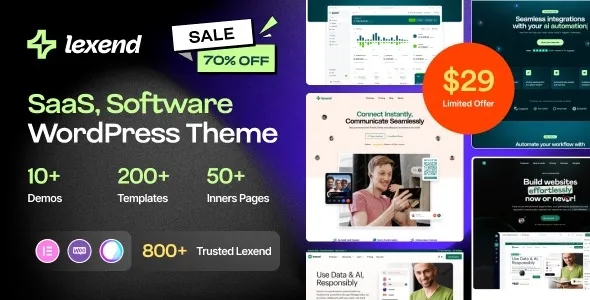
Lexend – Software, SaaS & Startup WordPress Theme is built for that middle ground. You get a startup-style layout system, sections that map to common SaaS pages (features, pricing, integrations, docs-style content), and a design language that stays coherent when you add blog posts, legal pages, and conversion pages.
I have seen teams pick a “pretty” theme and then spend days rebuilding the same hero, logo strip, and pricing table over and over. With Lexend, the main win is reducing that rebuild cycle. You start from patterns that are already aligned with how SaaS sites are structured.
If you are building a software or startup site, your pages tend to repeat the same building blocks. The difference is the message, not the layout. Lexend is useful when you want those blocks to stay editable without turning every page into a one-off.
In practice, we used it to spin up a product marketing site with a blog, a lightweight documentation area, and a couple of campaign landing pages. The theme’s section patterns made it easier to keep spacing and typography consistent, especially when multiple people were editing content.
It also helps when you need a clean path from “homepage pitch” to “pricing decision.” A lot of themes nail the homepage but treat pricing and feature detail pages as an afterthought. Lexend’s structure is more aligned to the funnel you actually maintain.
Lexend is not “set and forget.” Like most modern WordPress themes, you will get the best results when you treat it as a system and not a pile of demo pages.
The first friction I ran into was template drift. If you import multiple demos or mix templates, spacing and button styles can diverge slightly. It is fixable, but you want to decide early on which typography and spacing rules are your baseline, then stick to them.
The second issue is plugin overlap. Teams often install three different tools for popups, forms, and page sections, and then blame the theme for bloat. Lexend works best when you keep the stack lean and avoid duplicating features across plugins.
Lexend gives you the front-end structure. It does not replace product onboarding, billing, or app UI. I mention this because we have had stakeholders assume the theme would “handle the dashboard” or “include a customer portal.” It is a marketing site foundation, not a web app.
On a real site, the theme is rarely the only variable. The heavy hitters are usually images, third-party scripts, and page builder output. That said, Lexend pages can become heavier than expected if you stack too many animated sections and sliders above the fold.
What worked for us was treating animations as accents. Keep one primary motion element per section, not five. Also, compress hero images aggressively and avoid background videos unless you have a measurable reason.
If you are running WooCommerce alongside a SaaS marketing site, test your cart and checkout pages early. Some themes style forms beautifully on landing pages but forget about edge cases like coupon fields, validation messages, and mobile keyboard overlap. Lexend is generally clean, but you still need to click through every form state.
We got the smoothest results by locking the global design decisions first. Pick your base font pairing, button style, and section spacing, then build a small internal “pattern library” page that contains your standard hero, feature grid, testimonial block, and pricing layout.
From there, every new landing page becomes assembly, not design. That is where Lexend pays off. It is easier to maintain when you scale content output, whether that is weekly blog posts or frequent campaign pages.
Also, decide how you will handle long-form content. SaaS sites often start with short landing pages and then add deeper pages over time. Lexend works well when you define a readable blog and documentation style early, including heading sizes and table styling.
A starter theme can be great if you have a designer and a front-end developer on hand. But most teams end up recreating the same SaaS sections repeatedly, and the site slowly becomes inconsistent. Lexend reduces that risk because the design language is already cohesive across common page types.
Compared to assembling everything from scratch, Lexend usually wins on time-to-first-launch. Where a starter theme can win is long-term flexibility if you are building a very custom brand system and you have the resources to maintain it.
If you are deciding between Lexend and a multipurpose theme, the difference is focus. Multipurpose themes often ship with everything, which sounds good until you are trying to keep the site light and the editor experience predictable. Lexend is more opinionated toward software and startup layouts, which is often what you want.
If you are looking for the Lexend – Software, SaaS & Startup WordPress Theme download, treat it like any other production dependency. Use a clean copy, keep version history, and test changes in staging before you touch your live site.
1) Prepare a staging site. Clone your site or use a staging environment so you can test imports and plugin interactions without downtime.
2) Upload the theme zip. In WordPress, go to Appearance > Themes > Add New > Upload Theme, then upload the Lexend theme package and activate it.
3) Install required companion plugins. After activation, you will usually be prompted to install recommended plugins. Install only what you need for the layouts you plan to use.
4) Import a demo carefully. If you import demo content, do it once, then remove what you do not need. Importing multiple demos is where style drift often starts.
5) Set global styles early. Configure typography, colors, and header/footer defaults before you build lots of pages. This prevents rework later.
6) Test key templates. Check homepage, pricing, blog post, and contact forms on mobile. Also test caching and minification plugins after the site looks correct.
7) Go live with a rollback plan. Before deploying, take a full backup and confirm you can revert quickly if a plugin conflict appears.
Yes, but test your product, cart, and checkout templates early. The theme styling is usually clean, yet WooCommerce edge states (errors, coupons, shipping notices) are where visual issues show up first.
If you want speed, import one demo that is closest to your structure and delete what you do not need. If your brand is strict and you have a clear design system, starting lighter can reduce cleanup time.
This typically comes from mixing template sections with different spacing rules or copying blocks from multiple demo pages. Pick one baseline page and reuse its section spacing and typography settings.
It can be, as long as you define readable defaults for headings, lists, tables, and code-style formatting. Many SaaS themes focus on landing pages, so you may need to tune the blog and content templates for depth content.
Plugin overlap and aggressive optimization. We have seen layout issues after enabling minification or combining scripts too early. Get the design stable first, then add caching and minification one change at a time.
Confirm the theme version matches what you intended, required plugins are installed cleanly, and your core templates render correctly on mobile. Then run a quick pass on Core Web Vitals basics: image sizes, font loading, and third-party scripts.
Geotoko is a trusted GPL website for WordPress themes, plugins, Shopify templates, and free giveaways. Download original, secure GPL files with lifetime updates.
All products on Geotoko are fully licensed under the GNU General Public License (GPL) and are independently reviewed for safety and quality.