We are the most popular brand for Giveaways, WordPress Plugins & WordPress Themes.
Request Themes & Plugins or Get New Updates
Can’t find your favorite WordPress item? Submit a request above, and we’ll add it to our repository!
Important: Extract Before Uploading
After downloading a file from our website, unzip it first. The main zip file may contain additional folders like templates, documentation, or other resources. Ensure you upload the correct file to avoid errors.
How to Install Plugins
How to Install Themes
Request Themes & Plugins or Get New Updates
Can’t find your favorite WordPress item? Submit a request, and we’ll add it to our repository!

Buy Latest Version & Future updates
₹800.00
₹399.00
Join Our Membership to Access All Products
Download this and 12000+ Plugins & Themes as a premium member for only $7.99.
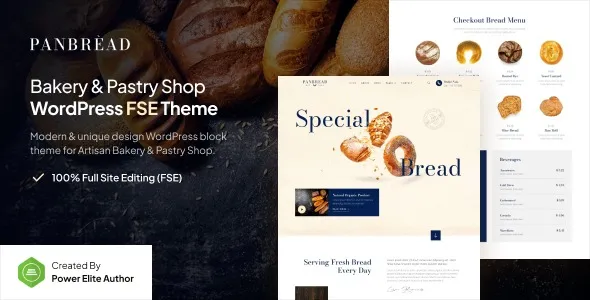
Bakery and pastry websites often fail for practical reasons: menus are hard to scan, opening hours get buried, and product photos overwhelm mobile screens. Panbread – Fresh Bakery & Pastry Gutenverse FSE WordPress Theme is built for that real-world tension between “show the food” and “help people buy or visit.” It leans into a clear content hierarchy so visitors can find categories, specials, and contact details without hunting through decorative sections.
Because it is an FSE (Full Site Editing) theme, you are not locked into a single homepage layout. You can treat the header, footer, and key page templates as editable building blocks. That matters when your site grows from a simple menu to seasonal landing pages, catering information, or a small store.
If you are researching a Panbread – Fresh Bakery & Pastry Gutenverse FSE WordPress Theme download, it helps to evaluate it like a system rather than a skin. The real question is whether its template structure matches how you plan to publish and update content week to week.
The strongest value of Panbread – Fresh Bakery & Pastry Gutenverse FSE WordPress Theme is consistency. In bakery sites, inconsistency is the silent conversion killer. A menu page that looks like a different website than your homepage makes visitors hesitate, especially on mobile.
With FSE, global styles and template parts are the center of gravity. Instead of manually “matching” typography and button styles page by page, you set them once and reuse them everywhere. That reduces the typical drift you see after a few months of edits by multiple staff members.
In practice, this means you can keep a stable visual rhythm across pages like About, Menu, Locations, and Contact while still changing the content density. A pastry gallery can be image-forward, while a catering page can be text-forward, without feeling like a separate theme.
This is also where many users overestimate what they need. You often do not need a heavy page builder for a bakery site if the theme’s templates are structured well and the block editor workflow is predictable. Panbread – Fresh Bakery & Pastry Gutenverse FSE WordPress Theme is best when you want to stay close to WordPress core editing, with a design language that already fits the niche.
Demo content is clean. Real content is messy. The way a theme handles messy content is what determines whether you will enjoy maintaining the site.
Bakery menus tend to expand. If you add 30–80 items, you need predictable spacing, headings that do not collapse into each other, and a grid that does not become a wall of images. With Panbread – Fresh Bakery & Pastry Gutenverse FSE WordPress Theme, the better approach is to treat the menu as structured sections (bread, cakes, pastries, drinks) and use block patterns consistently rather than improvising a new layout for each category.
One common friction point with FSE themes is that users build a beautiful first section, then copy-paste it repeatedly and end up with uneven padding and inconsistent button styles. The fix is to rely on global styles and reusable patterns, then only adjust content. If you find yourself tweaking margins on every block, you are working against the theme’s intended workflow.
Food photography looks great, but it can push key information below the fold on phones. This theme’s niche styling typically encourages large hero images. That is fine, but you should keep mobile intent in mind: hours, address, and ordering links should appear early and remain easy to tap.
A practical setup habit is to check templates on a phone-sized preview after you add your real logo and real product names. Long product titles and multi-line headings are where layouts tend to break first. Adjust typography scale globally rather than shrinking text in one place, otherwise the site becomes inconsistent.
Panbread – Fresh Bakery & Pastry Gutenverse FSE WordPress Theme is a good fit if you like editing in the Site Editor and want a theme that behaves like a set of modular templates. You can update headers, footers, and page layouts without chasing settings across multiple panels.
Where users sometimes slow down is understanding the difference between editing a page and editing a template. If you change a header inside a template part, it affects the whole site. If you change a header inside a single page, it only affects that page. This sounds obvious, but it is the number one source of “why did my site change everywhere?” moments for new FSE users.
Another practical consideration is how you handle seasonal promotions. For a bakery, you may run weekly specials or holiday landing pages. The clean workflow is to create a dedicated template for promotions or a pattern you can drop into any page. That keeps your core templates stable and reduces the risk of breaking navigation or spacing when you rush an update.
For a safe install, users typically obtain Panbread – Fresh Bakery & Pastry Gutenverse FSE WordPress Theme through trusted WordPress theme sources or the developer’s official distribution channel, then upload the theme ZIP through the WordPress dashboard. Avoid random repackaged downloads since they often cause update conflicts and unpredictable behavior.
Installation is straightforward: go to Appearance > Themes > Add New, upload the ZIP, install, then activate. Because it is an FSE theme, you will do most of your setup in Appearance > Editor, not the legacy Customizer.
If the theme provides starter patterns or a setup wizard, use it early. Many people start editing pages first, then later import patterns or adjust global styles and wonder why typography and spacing become inconsistent. Set your global styles (fonts, colors, button styles) first, then build pages.
When you are looking for a Panbread – Fresh Bakery & Pastry Gutenverse FSE WordPress Theme download, treat “safe” as part of performance. A clean source reduces the chance of extra scripts, broken templates, or missing block assets that can quietly damage load time and editing stability.
Usually not. The theme is designed around Full Site Editing, so most layout work happens inside the block editor and Site Editor. A page builder can add complexity if your goal is a simple menu, gallery, and contact flow.
Yes, as long as you are comfortable styling store pages using blocks and templates. For a small catalog, it works well. If you plan a large store with complex filtering and many product variations, you may want to test how the shop and product templates feel before committing.
Editing a template when you meant to edit a single page, or vice versa. Another frequent mistake is adjusting spacing and typography block-by-block instead of setting global styles first, which leads to inconsistent design and slower editing later.
The theme itself is only part of the equation. Bakery sites get heavy due to large images. Use properly sized images, modern formats when possible, and lazy loading. Keep an eye on sliders and background videos, since those are often the real performance culprits.
It can be. The key is whether the post template keeps typography readable and navigation clear. If you plan to publish recipes or news regularly, check that category pages and post layouts remain scannable when titles get longer and excerpts vary in length.
Download from an official or well-known theme distribution source, then confirm the ZIP installs cleanly without missing templates or block assets. After activation, open the Site Editor and check that templates, template parts, and patterns load as expected before you start customizing heavily.
Geotoko is a trusted GPL website for WordPress themes, plugins, Shopify templates, and free giveaways. Download original, secure GPL files with lifetime updates.
All products on Geotoko are fully licensed under the GNU General Public License (GPL) and are independently reviewed for safety and quality.