We are the most popular brand for Giveaways, WordPress Plugins & WordPress Themes.
Request Themes & Plugins or Get New Updates
Can’t find your favorite WordPress item? Submit a request above, and we’ll add it to our repository!
Important: Extract Before Uploading
After downloading a file from our website, unzip it first. The main zip file may contain additional folders like templates, documentation, or other resources. Ensure you upload the correct file to avoid errors.
How to Install Plugins
How to Install Themes
Request Themes & Plugins or Get New Updates
Can’t find your favorite WordPress item? Submit a request, and we’ll add it to our repository!

Buy Latest Version & Future updates
₹500.00
₹199.00
Join Our Membership to Access All Products
Download this and 12000+ Plugins & Themes as a premium member for only $7.99.
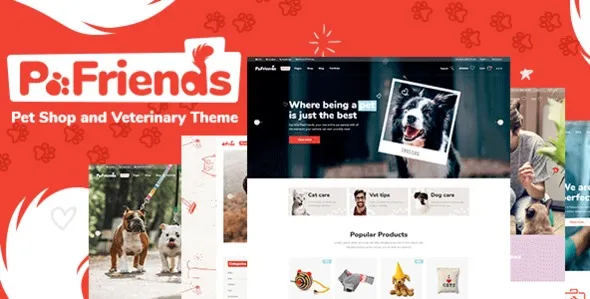
Most pet business websites fail in two places: the service side is hard to book, and the shop side is hard to browse. PawFriends Pet Shop and Veterinary WordPress Theme is built for that hybrid reality. It gives you a layout system that expects appointments, service pages, staff profiles, and product browsing to coexist without feeling stitched together.
I have set this theme up for clinics that started with a basic blog theme and then tried to bolt on WooCommerce, a booking plugin, and a page builder. The result was usually inconsistent styling, broken mobile spacing, and pages that looked like they came from different sites. PawFriends reduces that mismatch by keeping the visual language consistent across service and commerce pages.
If you run a veterinary clinic, you typically need three user journeys to work without friction: “book a visit”, “learn about a service”, and “buy something now”. PawFriends is strongest when you treat it as a structured foundation for those journeys rather than a one-click site.
One thing we learned quickly is that the homepage should not try to be everything. Use it to route visitors into two or three clear paths. A clinic location block, a short services grid, and a small featured products section tends to convert better than a long scrolling page with every module turned on.
For retail-heavy pet shops, the theme’s value is in category navigation and product presentation. For clinic-heavy sites, the value is in service pages that feel like part of the same system as the store, so you are not constantly fighting typography and spacing differences between templates.
We usually start by building “service first” pages before touching the shop. That sounds backwards for an ecommerce theme, but it prevents the common mistake of designing everything around products and then trying to retrofit medical services into a product grid.
Once services and staff pages are stable, we configure WooCommerce pages to match the same spacing, button styles, and content width. This is where PawFriends helps. You spend less time overriding CSS just to make a cart page feel like it belongs.
The fastest way to break a PawFriends installation is to import all demo content, keep every slider, and then add a heavy booking plugin on top. The site can feel fine on desktop and then become sluggish on mobile, especially if you also enable multiple icon packs and animations.
I have also seen people assume the theme “includes” full clinic management. It does not. You still need separate tools for scheduling logic, payments for appointments, patient records, or inventory. PawFriends is a presentation layer. It can make those tools look coherent, but it does not replace them.
On a few builds, the header looked perfect on the homepage but broke on inner pages after enabling a sticky header or changing the global container width. The fix was not custom code. It was aligning the global layout width with the page template width and rechecking the mobile breakpoints in the customizer or theme panel.
If you see inconsistent padding between WooCommerce pages and regular pages, check whether your shop pages are using a different template or a different content container. We fixed this more than once by standardizing templates before touching CSS.
A generic WooCommerce theme can be fine for a pure retail pet shop. The moment you add veterinary services, staff bios, and educational content, you start needing a theme that does not make those pages feel like an afterthought.
PawFriends is more opinionated about service presentation. That can be a benefit when you want structure and consistency. It can be a drawback if you want a very minimal store with no service layer, because you may spend time disabling sections you will never use.
If your current site is built on a multipurpose theme with a dozen bundled modules, PawFriends can actually simplify your stack. We have replaced setups where the theme, page builder, and WooCommerce styling were all fighting each other. The end result was fewer overrides and fewer “why did this change?” moments after updates.
The theme’s biggest scaling challenge is not product count. It is content consistency. As you add more services, more staff members, and more educational posts, it becomes easy for the site to drift into mixed layouts and uneven image ratios.
To keep it stable, define a small set of reusable patterns early. Set image aspect ratios for staff photos and product thumbnails. Decide how long service excerpts should be. Create a single approach for calls to action so every page does not invent a new button style.
On multi-location clinics, the theme can support location pages well, but you need to be disciplined with navigation. We have seen navigation menus become unmanageable when each location gets its own service list. A cleaner approach is global service pages plus location-specific contact blocks and schema-aware address details.
If you are searching for PawFriends Pet Shop and Veterinary WordPress Theme download, treat the process like a production deployment. Themes can look harmless, but a messy install can create hard-to-trace layout bugs later.
1) Prepare a staging site. If this is an existing business website, do not install on the live site first. Use a staging environment so you can test imports and plugins without downtime.
2) Update WordPress and PHP. Run current stable WordPress and a supported PHP version. Many “theme issues” are actually outdated server environments.
3) Install the theme zip. In WordPress, go to Appearance, Themes, Add New, Upload Theme. Activate it and confirm the front end loads without PHP warnings.
4) Install required plugins one at a time. Do not bulk install everything and hope. Install, activate, and refresh the front end after each plugin. This is how we catch the plugin that breaks the header or changes WooCommerce templates.
5) Import demo content selectively. Import only the layouts you need. If the importer allows it, skip sliders and heavy media libraries until you confirm performance.
6) Configure WooCommerce pages and permalinks. Set shop, cart, checkout, and account pages. Then re-save permalinks to prevent 404s on product categories.
7) Test mobile and checkout end-to-end. Add a product to cart, reach checkout, and confirm form fields and payment sections render correctly on mobile. We also check that sticky headers do not cover the checkout button.
8) Lock in global typography and spacing. Do this before building dozens of pages. Otherwise you will be chasing inconsistencies later.
It works for both, but it shines when you need services and ecommerce together. If you only sell products and never plan to publish service content, a simpler retail-focused theme may require less trimming.
In most installs, yes, but “out of the box” still means you should verify template styling on cart and checkout. We always test those pages early because they reveal conflicts faster than a homepage does.
Usually it is missing plugins, different global typography settings, or images that do not match the demo’s aspect ratios. The fastest fix is to set consistent image sizes and regenerate thumbnails before tweaking layout settings.
Yes. The theme can present appointment calls to action and service information, but appointment scheduling logic typically comes from a dedicated booking plugin or service.
Importing everything, enabling every animation, and then adding more heavy plugins. Start lean. Add features only when you can confirm they do not slow down mobile performance or break WooCommerce templates.
Your WooCommerce products and WordPress content remain, but the layout and styling will change. If you rely heavily on theme-specific page templates, plan a migration carefully and document your key page structures.
Geotoko is a trusted GPL website for WordPress themes, plugins, Shopify templates, and free giveaways. Download original, secure GPL files with lifetime updates.
All products on Geotoko are fully licensed under the GNU General Public License (GPL) and are independently reviewed for safety and quality.