We are the most popular brand for Giveaways, WordPress Plugins & WordPress Themes.
Request Themes & Plugins or Get New Updates
Can’t find your favorite WordPress item? Submit a request above, and we’ll add it to our repository!
Important: Extract Before Uploading
After downloading a file from our website, unzip it first. The main zip file may contain additional folders like templates, documentation, or other resources. Ensure you upload the correct file to avoid errors.
How to Install Plugins
How to Install Themes
Request Themes & Plugins or Get New Updates
Can’t find your favorite WordPress item? Submit a request, and we’ll add it to our repository!

Buy Latest Version & Future updates
₹500.00
₹250.00
Join Our Membership to Access All Products
Download this and 12000+ Plugins & Themes as a premium member for only $7.99.
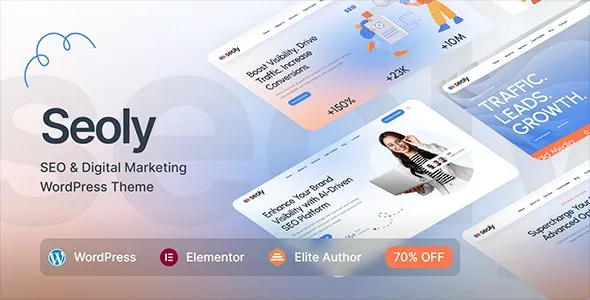
Seoly is built for one job: presenting an SEO or digital marketing service in a way that feels structured, measurable, and easy to navigate. That sounds obvious, but many “agency” themes lean too hard into visuals and leave you fighting the layout when you need to explain deliverables, show case studies, or capture leads.
On a live site, what I noticed first is that Seoly’s strength is its page composition. You can get from a blank install to a credible services site quickly, without inventing your own information architecture. When we migrated a small consultancy from a generic multipurpose theme, the biggest win was simply fewer decisions. The service pages stopped looking like blog posts and started reading like proposals.
If you sell SEO audits, local SEO, PPC management, or ongoing retainers, Seoly’s template approach helps you standardize how you present each offer. That matters when you scale content across multiple services or locations.
I typically set it up with a repeatable pattern: a service overview, what’s included, proof (case studies or metrics), then a conversion block. Seoly’s layouts make that pattern feel natural, so you spend time on copy and positioning rather than wrestling with spacing and section hierarchy.
One practical detail: when you build multiple landing pages, consistency becomes a ranking and conversion advantage. Users do not have to relearn your site on every page, and crawlers get clearer internal linking signals because page structures are more predictable.
It is easy to overestimate what an “SEO theme” delivers. Seoly can help with clean presentation, sensible headings, and a layout that supports strong on-page copy. It does not replace technical SEO, content strategy, or a proper SEO plugin.
In our tests, the theme’s real SEO value came from enabling better pages, not from magical settings. If you pair it with a solid SEO plugin, optimize templates for indexable service pages, and keep navigation tight, Seoly becomes a good foundation. If you install it and expect rankings to move without content work, nothing meaningful will change.
Seoly is easiest when you decide early whether the site is “service-first” or “content-first.” Service-first means the main menu and internal links prioritize service and case study pages. Content-first means categories, guides, and topical clusters lead the structure.
The mistake I see is mixing both without a plan. You end up with thin service pages and a blog that cannibalizes intent. If you are building for download-intent searches like “Seoly – SEO & Digital Marketing WordPress Theme download,” you also want a clear product-focused page that does not compete with unrelated posts targeting “SEO theme” broadly.
Another friction point: demo imports can add a lot of placeholder pages and media. If you import everything and then delete half of it, you can leave behind orphaned internal links and menu items. We usually import only the core demo structure, then build the remaining pages deliberately. It is slower for an hour, faster for the next year.
With a multipurpose theme, you can absolutely build an SEO agency site, but you will spend more time making decisions that Seoly already makes for you. The trade-off is flexibility. Seoly’s design language is opinionated, which is good when you want cohesion and speed, and less ideal when you want a totally custom visual identity.
In practice, Seoly tends to reduce “layout drift.” On generic themes, different editors create pages with different section styles, spacing, and CTA placement. Over months, the site feels inconsistent. Seoly’s templates and components encourage a more uniform structure, which helps both user trust and editorial control.
Update WordPress core and ensure your PHP version and memory limits are reasonable for modern themes. If you are moving an existing site, take a full backup first. We have seen imports fail simply because the hosting environment was underpowered.
When you download Seoly – SEO & Digital Marketing WordPress Theme, confirm you have the installable theme ZIP. Many theme packages include documentation and child theme files in a larger archive, so you may need to locate the correct ZIP inside it.
Go to Appearance > Themes > Add New > Upload Theme. Upload the ZIP, install, and activate. If the upload fails, it is usually a server upload limit issue, not the theme itself.
After activation, WordPress will prompt you to install companion plugins used by the theme’s layouts and widgets. Install them, then activate. Do not skip this step if you plan to use the demo layouts, because missing plugins often equals broken sections.
Choose a demo that aligns with your site type. Importing a “full agency” demo when you only need a single service landing page can create cleanup work. If you do import, check menus, homepage assignment, and permalink settings immediately after.
Check mobile breakpoints, header behavior, and page speed basics. Then crawl the site with a tool to catch 404s, missing titles, and accidental noindex settings before you publish.
Before writing new pages, I usually lock down three things: permalink structure, navigation hierarchy, and which pages should be indexable. This prevents “demo debris” from getting crawled and indexed.
We also set up consistent templates for service pages and case studies. That reduces duplicate-intent issues where multiple pages accidentally target the same query with slightly different wording. Seoly makes it easier to standardize those templates, but you still need to define the rules.
It works for both. If you are running a one-page site, keep the navigation anchored and avoid publishing extra demo pages. For SEO growth, multiple focused pages usually perform better because each page can match a specific intent.
It depends more on your hosting, images, and how many plugins you add than the theme name itself. The common slowdown I see comes from importing heavy demos and leaving large images uncompressed. Start lean, then add sections as needed.
Yes. Seoly helps with layout and presentation, but you still need control over titles, meta descriptions, canonical URLs, schema options, and indexing settings. A dedicated SEO plugin is the right tool for that.
Usually the homepage is not assigned, or the menu and widget areas are not set. Check Settings > Reading for the homepage assignment and Appearance > Menus for the primary menu location.
You can, but you may spend time rewriting section labels and reshaping templates that assume marketing services. If your business is product-led or portfolio-led, a more neutral business theme might require less adaptation.
Confirm headings are in a logical order, remove placeholder content, ensure internal links point to real pages, and verify that only the pages you want are indexable. Also check that contact forms and CTAs work on mobile.
Yes. Keep the layout consistent but vary the substance. Each service page should have distinct deliverables, proof, FAQs, and examples. Avoid swapping only a few keywords while keeping the rest identical, because that creates duplicate-intent pages that struggle to rank.
If you are publishing a product-focused page, keep it clearly separated from blog tutorials and theme roundups. Use a dedicated page that explains what the theme enables, how to install it safely, and what to expect, rather than trying to force that intent into unrelated posts.
Geotoko is a trusted GPL website for WordPress themes, plugins, Shopify templates, and free giveaways. Download original, secure GPL files with lifetime updates.
All products on Geotoko are fully licensed under the GNU General Public License (GPL) and are independently reviewed for safety and quality.