We are the most popular brand for Giveaways, WordPress Plugins & WordPress Themes.
All Download Files
Request Themes & Plugins or Get New Updates
Can’t find your favorite WordPress item? Submit a request above, and we’ll add it to our repository!
Important: Extract Before Uploading
After downloading a file from our website, unzip it first. The main zip file may contain additional folders like templates, documentation, or other resources. Ensure you upload the correct file to avoid errors.
How to Install Plugins
How to Install Themes
Request Themes & Plugins or Get New Updates
Can’t find your favorite WordPress item? Submit a request, and we’ll add it to our repository!

Buy Latest Version & Future updates
₹800.00
₹199.00
Join Our Membership to Access All Products
Download this and 12000+ Plugins & Themes as a premium member for only $7.99.
Most WordPress audio players fail in two predictable ways. They look fine on a demo page, then break your layout when you add real track metadata, or they become a maintenance chore once you publish more than a handful of mixes.
Sonaar MP3 Music Player PRO is the first player I have used where the “album” concept actually holds up on a live site. It is built for musicians, podcasters, labels, and anyone publishing multiple tracks who needs playlists, track lists, and a player that stays consistent across pages.
If you are searching for Sonaar MP3 Music Player PRO download because you want a player that is more than a single embedded audio tag, this is the plugin that tends to survive real content volume.
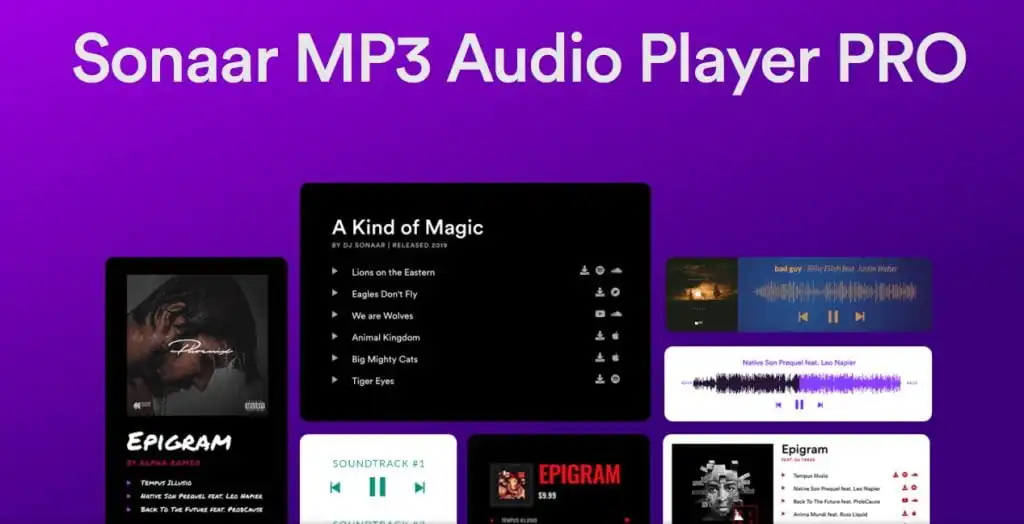
At its best, Sonaar MP3 Music Player PRO lets you publish audio as a structured library. Tracks can be grouped into albums or playlists, displayed with artwork and track lists, and played in a way that feels like a mini streaming app inside WordPress.
Where people overestimate it is expecting it to replace hosting, distribution, or DRM. It is a front-end player and library experience. You still need a reliable audio hosting setup, and you still need to think about file size, caching, and where those MP3s live.
The biggest difference shows up after you have 20, 50, or 200 tracks. A basic audio block works until you need consistent presentation, navigation, and a way for visitors to stay listening while browsing.
We ran into this on a site with a growing back catalog. The default approach created pages with mismatched players, inconsistent loudness, and no obvious “next track” behavior. After moving to Sonaar MP3 Music Player PRO, the content became easier to browse and much easier to keep visually consistent.
Instead of stacking individual audio blocks, you can present a single player with a track list. That reduces clutter and makes the page easier to scan, especially on mobile.
Once configured, you can keep the same player style across posts, pages, and custom post types. That matters when you are trying to make a music section feel like a product, not a collection of random posts.
I have seen the same issues repeat across projects, and most are not “bugs” so much as predictable setup friction.
If your site is on HTTPS but your MP3 URLs are served over HTTP, browsers will block or partially block playback. This can look like a “player not working” issue when it is really a mixed content problem. Fix the source URLs first, then test again.
Large libraries with heavy artwork can make initial render feel sluggish. The player is not the only factor. Unoptimized images and oversized MP3 files are usually the real culprit. Compress artwork, keep consistent image dimensions, and avoid uploading 20 MB tracks when a smaller bitrate would be indistinguishable for most listeners.
Some themes aggressively style lists, buttons, and icons. That can distort track lists or hide controls. When I troubleshoot this, I temporarily switch to a default theme to confirm the player is fine, then scope a small CSS override rather than fighting the entire theme stylesheet.
The WordPress audio block is dependable, but it is intentionally minimal. It does not give you a cohesive library experience, and it is not designed to carry a brand-consistent player UI across dozens of pages.
Many lightweight playlist plugins work until you need albums, artwork, and a cleaner way to present track lists. They often rely on shortcodes that become hard to maintain at scale, or they produce markup that is difficult to style without brittle CSS.
Sonaar MP3 Music Player PRO sits in the middle ground where you get a real player experience without having to build a custom audio app. It is still WordPress, still theme-dependent, but it gives you a stronger foundation than the default tools.
Update WordPress and your theme first. If you are adding this to a production site, take a backup and test on staging. Audio libraries can touch a lot of pages, so rollbacks matter.
In WordPress, go to Plugins, then Add New, then Upload Plugin. Choose the Sonaar MP3 Music Player PRO ZIP file, install it, and activate it.
Open a page with a player instance and check the browser console for blocked scripts, mixed content warnings, or 404s. If anything fails here, fix it before building your library.
Start with 3 to 5 tracks. Add artwork and titles, then test playback on desktop and mobile. This is where you catch theme conflicts early.
Choose your player layout and typography once, then reuse it. If you change styles after publishing 100 playlists, you will end up revisiting pages you thought were done.
Test a page with a longer track list. Measure load time and watch for oversized images. If you are using a caching plugin or CDN, purge cache and retest to confirm nothing is breaking the player scripts.
If you publish an occasional single audio clip, the native WordPress audio block is simpler and harder to break. I would not add a heavier player layer for one-off embeds.
Also, if your primary goal is gated content, DRM, or subscription-based streaming, you will still need a membership or e-commerce layer. Sonaar MP3 Music Player PRO can present audio beautifully, but it is not a full access-control system by itself.
Yes, self-hosted MP3s are a common setup. Just make sure your server is configured for proper MIME types and that your URLs are HTTPS to avoid browser blocking.
You can, especially if you want a cleaner playlist experience than a standard episode list. For traditional podcast distribution and feeds, you still need a podcast workflow, but the on-site player experience can be handled here.
This is usually theme CSS overriding buttons, lists, or icon styles. Test with a default theme to confirm, then add small, targeted CSS fixes rather than changing global theme styles.
Mixed content and blocked file URLs are common. Another frequent issue is hosting MP3s in a way that restricts range requests or hotlinking, which can prevent reliable streaming on some devices.
It can if you load huge artwork or long track lists without optimizing media. In practice, the biggest wins come from compressing images, keeping MP3 sizes reasonable, and using caching correctly.
Yes, but plan for a small amount of CSS work on real sites. I rarely see a perfect match out of the box when a theme has strong typography and button styling.
It is strong for presenting previews and building a listening experience. For selling downloads or access, pair it with a proper e-commerce or membership setup and treat the player as the front-end layer.
Geotoko is a trusted GPL website for WordPress themes, plugins, Shopify templates, and free giveaways. Download original, secure GPL files with lifetime updates.
All products on Geotoko are fully licensed under the GNU General Public License (GPL) and are independently reviewed for safety and quality.