We are the most popular brand for Giveaways, WordPress Plugins & WordPress Themes.
Request Themes & Plugins or Get New Updates
Can’t find your favorite WordPress item? Submit a request above, and we’ll add it to our repository!
Important: Extract Before Uploading
After downloading a file from our website, unzip it first. The main zip file may contain additional folders like templates, documentation, or other resources. Ensure you upload the correct file to avoid errors.
How to Install Plugins
How to Install Themes
Request Themes & Plugins or Get New Updates
Can’t find your favorite WordPress item? Submit a request, and we’ll add it to our repository!

Buy Latest Version & Future updates
₹500.00
₹199.00
Join Our Membership to Access All Products
Download this and 12000+ Plugins & Themes as a premium member for only $7.99.
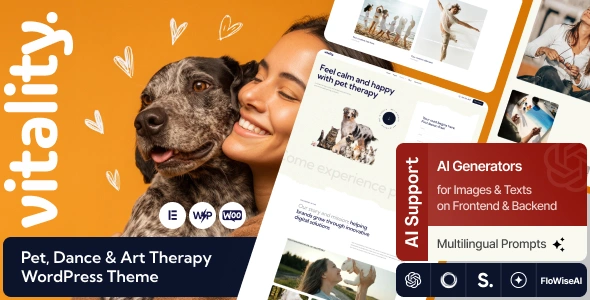
Most therapy and studio sites fail for one simple reason. The visitor cannot quickly answer “What do you do, who is it for, and how do I book?” Vitality Pet, Dance & Art Therapy WordPress Theme is built around that exact path. It is not trying to be a multipurpose monster. It is trying to get you from first impression to enquiry, class signup, or consultation request without the usual WordPress clutter.
I have set this theme up on live sites where the owner needed three different service tracks (pet therapy sessions, dance classes, and creative workshops) under one brand. The biggest win was not the visuals. It was the way the layout encourages you to separate services, staff, schedules, and contact points so Google and humans can both understand the site.
Vitality is best treated as a service theme with strong presentation patterns. You can build a homepage that introduces your practice, highlight programs, show testimonials, and route visitors to booking or contact. It supports the kind of content therapy and studio businesses actually publish: session types, class timetables, instructor bios, gallery work, and events.
Where people overestimate it is eCommerce and complex membership. You can add WooCommerce if you want to sell a few products or accept payments, but if your business model depends on advanced subscriptions, member dashboards, or multi-step scheduling logic, plan on adding dedicated plugins and some extra styling work.
For E-E-A-T, the theme is helpful because it gives you obvious places to surface credentials, practitioner experience, safeguarding notes, and clear contact details. Those are trust signals that matter in “your money or your life” adjacent spaces like therapy and wellbeing.
Pet therapy, dance instruction, and art therapy attract different intent. Parents search differently than adult learners. Referrers and healthcare partners read differently than casual visitors. When you cram everything into one “Services” page, you create duplicate-intent pages that compete with each other and dilute ranking potential.
Vitality’s structure nudges you toward cleaner information architecture. In practice, we got better crawl prioritization by creating distinct service hubs and linking them from the homepage with consistent labels. That reduced “thin” pages and helped Search Console stop treating key pages as near-duplicates.
When you install Vitality, do not start by swapping colors and fonts. Start by deciding what your primary indexed pages are. I usually aim for: one homepage, 3–6 service pages, an about page with practitioner credentials, a contact/booking page, and a small set of supporting posts or FAQs.
We have seen better results when each service page answers one intent. For example: “Art therapy for children” should not also be the page for “corporate creative workshops.” Split them. Use internal links between them, but keep the primary query intent clean.
Also, do not publish every demo page. Demo imports often include multiple versions of the same page type (two “About” pages, three “Home” pages). That creates crawl waste and duplicate signals. Import what you need, then delete the rest before indexing.
If you are looking for the Vitality Pet, Dance & Art Therapy WordPress Theme download, treat it like any production theme deployment. A clean install prevents the weird layout glitches and missing assets that people blame on “the theme.”
1) Prepare your site
Update WordPress and PHP to a supported version for your host. Disable caching and minification temporarily. Take a full backup (files and database). If this is a redesign, work on a staging site.
2) Upload and install the theme
In WordPress, go to Appearance > Themes > Add New > Upload Theme. Upload the theme .zip, install, then activate. If the package includes a child theme, install it next and activate the child theme before you start editing.
3) Install required plugins
After activation, you will usually be prompted to install companion plugins. Install and activate them, but avoid adding “nice to have” plugins until the core layout is stable.
4) Import demo content selectively
If the theme provides a one-click import, run it once. Then immediately remove unused pages, posts, and placeholder images. Keep only the templates you will actually ship.
5) Configure permalinks and indexing basics
Set permalinks to “Post name.” Confirm Settings > Reading is not blocking indexing. Generate a sitemap with your SEO plugin and submit it to Search Console.
6) Replace demo content with real entities
Swap in real staff bios, credentials, service descriptions, and contact details. This is where E-E-A-T lives. Add photos of your space and team, not stock-only galleries.
7) Test mobile and forms
Test on iPhone and Android widths. Submit every form. If you use booking links, confirm they open correctly and do not get blocked by popups or mixed content warnings.
On real sites, the theme’s value shows up in repeatable page building. You can create a consistent pattern for each service: a short overview, who it is for, what happens in a session/class, outcomes, pricing guidance, and how to book. That consistency improves conversions and reduces the “where do I click” friction.
We also found it easier to keep media under control. Therapy and studio sites love galleries, but galleries can become a performance problem fast. Vitality pages tend to look fine even with fewer images, which helps you stay disciplined. Use fewer, higher-quality photos, and you will get faster pages and better Core Web Vitals.
If you have previously used a multipurpose theme, you might be used to endless demos and heavy builder dependencies. Vitality is narrower. That can feel limiting at first, but it reduces the “everything is possible so nothing is finished” loop.
The trade-off is that if you want a very custom layout, you may still need a page builder or custom blocks. When we pushed it into more complex landing pages, the site stayed manageable only when we standardized on a small set of blocks and avoided one-off sections that nobody could maintain later.
Compared with building from a bare-bones block theme, Vitality saves time on the service business essentials: structured sections, clear calls to action, and design coherence. You are paying for a head start, not for magic functionality.
Publishing demo duplicates. Leaving multiple demo homepages live is one of the fastest ways to confuse both users and crawlers. Keep one canonical version and redirect or delete the rest.
Using identical service intros. Many owners copy the same opening paragraph across services and change only a few words. That is duplicate-intent content. Write distinct intros that match the audience and the promise of that service.
Overloading the homepage. If you cram every service, every testimonial, every photo, and three different booking widgets into the homepage, it becomes slow and unfocused. Let the homepage route people. Let service pages do the explaining.
Forgetting accessibility basics. Alt text, readable contrast, and clear headings matter in wellbeing spaces. They also reduce bounce and improve engagement signals.
Yes. In that case, simplify the navigation and treat the site like a studio theme. Use one main “Classes” hub and separate pages for class types, schedules, and instructors.
It can work well if you create individual practitioner pages with credentials, specialisms, and availability. Make sure each bio is genuinely unique and includes real-world details, not generic text.
Delete unused pages, duplicate homepages, placeholder blog posts, and any taxonomy archives you do not plan to use. If you keep them, they can get indexed and dilute topical focus.
It can handle basic WooCommerce use, like selling a few products, gift vouchers, or simple session payments. For advanced booking workflows, you will likely need a dedicated booking plugin and careful testing.
Usually it is missing companion plugins, the demo import was not completed, or the site is showing cached CSS from the previous theme. Clear caches, confirm required plugins are active, and re-save the theme options or customizer settings.
Start each service page with a different problem and audience. Use different FAQs per service, add real photos specific to that offering, and avoid repeating the same “benefits” list everywhere.
It can be, but plan the structure first. Multilingual plugins can multiply URLs quickly, so keep your page count intentional and avoid importing extra demo pages you will never translate.
Geotoko is a trusted GPL website for WordPress themes, plugins, Shopify templates, and free giveaways. Download original, secure GPL files with lifetime updates.
All products on Geotoko are fully licensed under the GNU General Public License (GPL) and are independently reviewed for safety and quality.