We are the most popular brand for Giveaways, WordPress Plugins & WordPress Themes.
Request Themes & Plugins or Get New Updates
Can’t find your favorite WordPress item? Submit a request above, and we’ll add it to our repository!
Important: Extract Before Uploading
After downloading a file from our website, unzip it first. The main zip file may contain additional folders like templates, documentation, or other resources. Ensure you upload the correct file to avoid errors.
How to Install Plugins
How to Install Themes
Request Themes & Plugins or Get New Updates
Can’t find your favorite WordPress item? Submit a request, and we’ll add it to our repository!

Buy Latest Version & Future updates
₹500.00
₹199.00
Join Our Membership to Access All Products
Download this and 12000+ Plugins & Themes as a premium member for only $7.99.
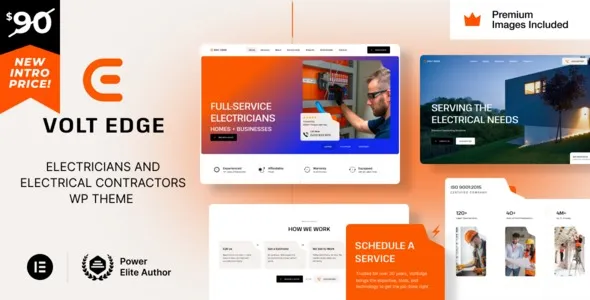
Most electrician sites fail for boring reasons. The phone number is hard to tap on mobile, service areas are buried, and the quote request form feels like an afterthought. VoltEdge Electrician Electrical Contractor WordPress Theme is built around the parts that actually convert for trade businesses: clear service pages, fast access to contact actions, and layouts that make trust signals easy to place without turning your homepage into a collage.
I have set up themes like this on live sites where the owner updates the hours once a year and expects everything else to keep working. VoltEdge is the kind of theme that can be handed off to a non-technical office manager after launch, as long as you set the foundations correctly.
The best use of VoltEdge is to treat it as a lead capture system with supporting content, not as a design project. The theme’s value shows up when you map each core service to a dedicated page, add location intent where it makes sense, and keep the navigation simple.
In practice, VoltEdge lets you publish service-specific landing pages that answer “Do you do this job?” quickly. That includes things like panel upgrades, EV charger installation, emergency call-outs, lighting, rewiring, and inspections. The theme structure also supports the basics that help with E-E-A-T: visible business details, service coverage, and a consistent place for credentials and warranties.
We have also used layouts like this to separate residential vs commercial work. That split matters because it changes the language, the proof you show, and the forms you use. If you try to force both audiences into one generic “Services” page, you will feel the friction later when you start ranking for specific queries.
The biggest mistake I see is leaving demo-style sections in place and swapping only the colors and logo. It looks finished, but it reads generic. Google can index it, yet it rarely earns strong engagement because it does not answer local intent clearly.
With VoltEdge, the fix is straightforward. Replace any broad hero message with a service + area statement. Add a short “how we work” block that matches your real workflow. Then create a dedicated page for each high-margin service and link to them from the homepage. That one move typically reduces bounce rates more than any design tweak.
Think in three layers: conversion pages, support pages, and trust pages.
Conversion pages are your service pages. Each one should include a quick scope list, what’s included, what’s excluded, and the next step. If you do emergency electrical repairs, say what counts as an emergency and what your response window usually is. People are searching under stress, and clarity converts.
Support pages include FAQs, service area notes, and guidance content like “What size EV charger do I need?” These pages catch long-tail searches and reduce repetitive calls.
Trust pages include licensing and insurance info, warranty policy, and a simple project gallery with captions that explain the job. Captions matter. A photo grid without context does not build confidence.
A lot of contractor sites are built from page builder kits that look impressive but become fragile. One update later, spacing shifts, buttons lose styling, or mobile menus behave oddly. VoltEdge tends to be easier to keep stable if you keep customization disciplined.
The practical approach is to set global typography and colors once, then avoid per-section overrides. When I have had to fix sites like this, the worst cases were dozens of unique font sizes and padding settings applied block by block. The theme can still work, but editing becomes slow and inconsistent.
If you want a site that your team can update without fear, use the theme’s patterns consistently and keep the layout system simple. You can still achieve a branded feel through imagery, icon style, and copy tone.
VoltEdge pages usually end up image-heavy because electrical work is visual. The fastest wins are boring: compress images, limit sliders, and avoid autoplay video on the homepage.
From an indexing standpoint, you want Google to spend crawl budget on service pages and location pages, not on thin tag archives or duplicate template variations. If you publish ten near-identical service pages with only the city name swapped, you are creating duplicate intent. Instead, build fewer, stronger pages and give each one a genuinely different angle. For example, “EV charger installation” can cover permitting, load calculation, and panel capacity. “Panel upgrade” can cover safety signs, code considerations, and downtime expectations.
I also recommend keeping one primary call-to-action per page. If you stack “Call now”, “Email”, “Book online”, and “Get quote” in the same viewport, users hesitate. Choose the action that matches the service urgency.
Before installing VoltEdge Electrician Electrical Contractor WordPress Theme on a live domain, set up staging. If you do not have staging, at least take a full backup and confirm you can restore it.
Update WordPress core and ensure your PHP version is current enough for modern themes. Many “random” theme issues are actually outdated server environments.
In WordPress, go to Appearance, then Themes, then Add New, then Upload Theme. Upload the theme ZIP, install, and activate.
After activation, install any companion plugins the theme prompts for. Do it in one pass, then refresh the admin to confirm nothing is stuck in an activation loop.
Demo import is useful for structure, but it often brings extra pages, posts, and media you will delete later. If you import, immediately remove unused pages and set your real homepage and menu.
Set permalinks to a clean structure (usually “Post name”). Confirm your site title, logo, favicon, and timezone. These details show up in unexpected places like structured snippets and email templates.
Create your top services, contact page, and about page. Only then adjust styling. This prevents you from polishing sections you will later remove.
Test tap-to-call, map links, and form emails. I always send test submissions to multiple addresses. A theme can look perfect while forms silently fail due to server mail settings.
It works for both. For a solo operator, keep the navigation minimal and focus on a handful of high-intent services. For multi-crew operations, add separate pages for residential and commercial, and consider individual service area pages if you truly serve distinct regions.
The theme helps with structure, but rankings come from pages that answer specific queries. VoltEdge gives you a clean framework. You still need service pages with real scope details, pricing expectations where appropriate, and proof elements like certifications and warranty terms.
It is rarely an outright penalty. The common issue is duplicate intent: many pages targeting the same keyword with slightly different headings. Avoid cloning a service page and swapping only the city name. Make each page earn its place with unique job details, constraints, and FAQs.
Yes, if you configure it intentionally. Put emergency contact options high on the page, but keep non-urgent services on separate pages so you do not confuse users. Also add clear hours and response expectations. That reduces angry calls and improves lead quality.
If you are comfortable building pages, starting from scratch usually results in a leaner site. If you are moving fast, import the demo for layout scaffolding, then delete anything you do not need. The key is not leaving demo copy and placeholder sections live.
This often happens when a child theme is not used and custom CSS is placed in theme files. Use the Customizer or a child theme for overrides. Also avoid mixing multiple icon libraries unless you know exactly what is loading on each page.
VoltEdge makes sense when you want a professional trade layout quickly, and your priority is turning traffic into calls and quote requests. It is also a good fit when you plan to publish multiple service pages and want them to feel consistent.
If your site is a single-page brochure with only a phone number and a few photos, you may not need a specialized theme at all. In that case, a lightweight default theme with one strong landing page can be enough.
For teams looking specifically for VoltEdge Electrician Electrical Contractor WordPress Theme download intent, the practical win is that you can install it, build a service-first structure, and avoid the usual “pretty but vague” contractor site problem. Keep the content grounded in real jobs, and the theme will do its part.
Geotoko is a trusted GPL website for WordPress themes, plugins, Shopify templates, and free giveaways. Download original, secure GPL files with lifetime updates.
All products on Geotoko are fully licensed under the GNU General Public License (GPL) and are independently reviewed for safety and quality.