We are the most popular brand for Giveaways, WordPress Plugins & WordPress Themes.
Request Themes & Plugins or Get New Updates
Can’t find your favorite WordPress item? Submit a request above, and we’ll add it to our repository!
Important: Extract Before Uploading
After downloading a file from our website, unzip it first. The main zip file may contain additional folders like templates, documentation, or other resources. Ensure you upload the correct file to avoid errors.
How to Install Plugins
How to Install Themes
Request Themes & Plugins or Get New Updates
Can’t find your favorite WordPress item? Submit a request, and we’ll add it to our repository!

Buy Latest Version & Future updates
$15.00
$4.99
Join Our Membership to Access All Products
Download this and 12000+ Plugins & Themes as a premium member for only $7.99.
If you have ever tried to turn a clinic website into something that works like a lead engine, you already know the pain points. A generic business theme gets you a pretty homepage, but it rarely handles the day to day needs of physiotherapy and rehab practices. You end up stitching together appointment CTAs, service pages, staff bios, insurance notes, and location details. It looks fine until you try to scale it across multiple practitioners or add a second location.
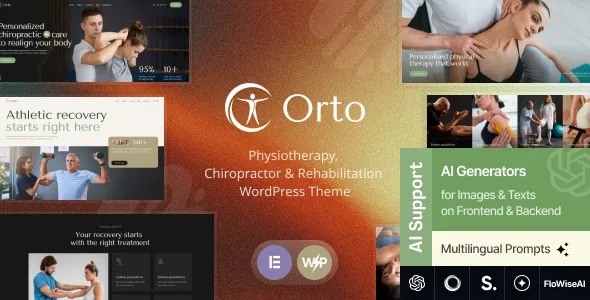
Ortho Physiotherapy, Chiropractor & Rehabilitation WordPress Theme is built around that clinic workflow. The value is not “design.” The value is having a site structure that makes it easier to publish service pages, highlight practitioners, and funnel visitors into booking or contact actions without rebuilding templates every time.
I have deployed similar clinic themes on live sites where the real problem was not aesthetics. It was consistency. This theme’s layout patterns are the kind that reduce decision fatigue when you are adding the 12th service page and you still want it to look intentional.
The first break is messaging. Rehab and chiropractic visitors are not browsing like ecommerce shoppers. They want reassurance, clarity on conditions treated, and a quick path to contact. A general theme pushes you toward broad marketing sections that do not answer “Can you help my back pain?” or “Do you treat post surgery rehab?”
The second break is navigation depth. Physiotherapy sites often need condition pages, service pages, and practitioner pages. If you do not plan that structure early, you end up with thin pages that overlap in intent and compete with each other in Google. That is a crawl and indexing problem, not just a UX problem.
The third break is trust. You can have great copy, but if your staff credentials, clinic policies, and contact details are buried or inconsistent, the site reads as low confidence. Themes like this help by making those elements easy to surface repeatedly across templates.
This theme is most useful when you treat your site as a publishing system. The patterns typically support the pages you actually need: services, conditions, practitioner profiles, testimonials, and a clear booking path.
In practical terms, it helps you do three things well:
1) Turn service pages into conversion pages. Instead of a wall of text, you can structure each service with outcomes, who it is for, what to expect, and a contact prompt that does not feel bolted on.
2) Keep practitioner and clinic details consistent. When we rebuilt a clinic site after a rushed launch, the biggest time sink was manually standardizing bios, qualifications, and contact blocks across pages. A clinic focused theme reduces that cleanup work.
3) Create a content architecture that avoids duplicate intent. You can separate “conditions treated” from “treatments offered” so you are not publishing five pages that all target the same query with slightly different wording. That matters for indexing and for long term content expansion.
Clinic themes often ship with demo content that looks great but creates hidden SEO debt if you copy it blindly. I treat the demo as a layout reference only.
First, I map page intent before building menus. A “Back Pain” page and a “Spinal Adjustment” page can both be valid, but they need distinct angles. Otherwise Google sees two pages trying to answer the same question.
Second, I check how the theme handles headings and internal sections. Some themes overuse H1 or repeat the same headings across templates. You want clean, page specific headings so your service pages are not clones with swapped keywords.
Third, I look at image handling. Rehab sites tend to be image heavy. If the theme encourages large hero images everywhere, you need a compression and lazy loading plan early. It is easier to set that standard before you upload 200 photos.
On a single page clinic site, almost any theme is “fast enough.” The difference shows up when you add 30 to 100 URLs for services, conditions, blog posts, and locations.
With Ortho Physiotherapy, Chiropractor & Rehabilitation WordPress Theme, the main win is predictable templates. Predictable templates make it easier to keep pages lightweight and consistent. That helps crawl prioritization because Google can discover and understand your site structure without wading through endless layout variations.
Still, the theme does not magically solve performance. If you import every slider and animation from the demo, you can slow the site down. On one build, we removed a heavy homepage slider, replaced it with a static hero and a single clear CTA, and saw a noticeable improvement in Core Web Vitals without changing hosting.
A theme can guide structure, but it cannot replace strategy. If you publish five near identical pages for “physiotherapy,” “physical therapy,” “rehab therapy,” “sports rehab,” and “injury rehab” with the same sections, you will still create duplicate intent.
It also will not handle clinical compliance for you. If you need specific consent language, privacy handling, or accessibility requirements, you still need to implement them. Treat the theme as a foundation, not a finished compliance package.
Finally, appointment handling depends on what you connect. Some clinics expect the theme to include a full booking system. In reality, you usually integrate a booking plugin or link to an external scheduling tool. Plan that integration early so your CTAs do not lead to dead ends.
Create a full backup of files and database. If you are installing on an existing site, set up a staging environment first. We have avoided painful rollbacks by testing demo imports on staging instead of production.
You will typically have a ZIP file for the theme. Keep it unmodified. If you also receive bundled plugins or child theme files, store them in the same folder so you do not lose track during setup.
In your WordPress dashboard, go to Appearance, then Themes, then Add New, then Upload Theme. Upload the ZIP, install, and activate. If WordPress throws a “missing stylesheet” error, it usually means you uploaded the wrong ZIP from a package. Look for the installable theme ZIP inside the download.
After activation, install only the plugins you actually need. If the theme suggests a page builder, decide early whether you are committing to that builder long term. Switching builders later is a common source of rebuild work and shortcode clutter.
Demo import is useful for layout reference, but it can also create dozens of low value pages, placeholder images, and duplicate titles. If you import, delete unused pages immediately and rewrite the rest with your real service structure.
Set permalink structure, connect your SEO plugin, and create your core pages first: homepage, services hub, about, contact, and practitioner index. This prevents you from publishing content into a messy URL structure that later needs redirects.
Yes, if you plan your page structure. Create a location hub page and individual location pages with unique details such as address, hours, staff, and local services. Do not clone the same content and swap the city name, because that creates duplicate intent.
Before editing design, set your navigation and core page hierarchy. Then build one complete service page as a template. Once you are happy with it, replicate the structure across other services with unique copy and FAQs per service.
Usually you will still need a booking solution. Many clinics link to an external scheduler or use a WordPress booking plugin. Test the booking flow on mobile, because most appointment clicks come from phones.
It can if you leave placeholder pages indexed. If you import, immediately noindex or delete unused demo pages, update titles and meta descriptions, and replace stock text. I have seen demo content accidentally indexed and sit in search results for months.
Give each service page a distinct purpose. Include who it is for, what conditions it addresses, what happens in a session, and what results people typically seek. Then keep condition pages separate and link them to relevant services instead of duplicating the same paragraphs.
Yes, and it is a good idea if you plan to modify templates or add custom functions. It reduces update risk. If you only change colors and typography through the customizer or builder settings, you may not need one.
Overbuilding the homepage. Clinics often try to cram every service, every testimonial, and every staff member above the fold. A simpler homepage with clear pathways to Services, Conditions, and Booking tends to perform better and loads faster.
Geotoko is a trusted GPL website for WordPress themes, plugins, Shopify templates, and free giveaways. Download original, secure GPL files with lifetime updates.
All products on Geotoko are fully licensed under the GNU General Public License (GPL) and are independently reviewed for safety and quality.