We are the most popular brand for Giveaways, WordPress Plugins & WordPress Themes.
Request Themes & Plugins or Get New Updates
Can’t find your favorite WordPress item? Submit a request above, and we’ll add it to our repository!
Important: Extract Before Uploading
After downloading a file from our website, unzip it first. The main zip file may contain additional folders like templates, documentation, or other resources. Ensure you upload the correct file to avoid errors.
How to Install Plugins
How to Install Themes
Request Themes & Plugins or Get New Updates
Can’t find your favorite WordPress item? Submit a request, and we’ll add it to our repository!

Buy Latest Version & Future updates
$15.00
$4.99
Join Our Membership to Access All Products
Download this and 12000+ Plugins & Themes as a premium member for only $7.99.
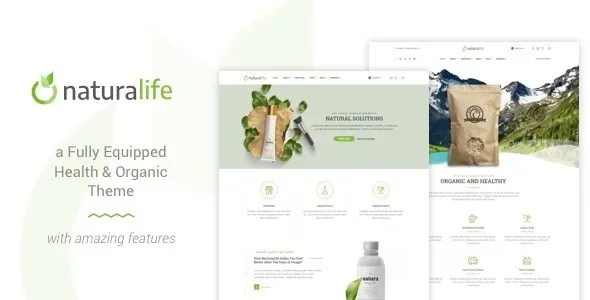
NaturaLife Health & Organic WordPress Theme is designed for stores that require a clean and trustworthy appearance without spending weeks refining templates. On paper, most organic and wellness themes sound identical. In practice, the difference shows up when you try to ship real pages fast, keep category navigation sane, and avoid a homepage that becomes a fragile stack of sliders.
I have seen this theme behave well for product-first stores that rely on clear taxonomy and repeatable layouts. Where it can break is the same place most WooCommerce themes break: too much demo content, too many blocks, and too many “almost the same” templates that make editors nervous to touch anything.
NaturaLife is most useful when you want a consistent merchandising system across health, organic food, supplements, skincare, or eco household categories. The theme’s value is not a single flashy widget. It is the ability to ship coherent product grids, promotional sections, and content-led landing pages without rebuilding every page type from scratch.
In real use, it supports a workflow where you can create a handful of repeatable page patterns: category landing pages, brand pages, ingredient-focused collections, and seasonal campaigns. That matters because SEO and conversion both improve when your internal linking and page intent are stable.
We also found it easier to keep “content + commerce” aligned. For example, you can publish a guide like “How to choose magnesium” and then route users into a curated collection without the page feeling bolted together. That tends to reduce pogo-sticking and improves crawl efficiency because Google sees a clearer hierarchy of informational pages feeding transactional ones.
The first friction point is demo import. It is tempting to import everything, but that often creates dozens of pages you never use, plus duplicate sections that compete for internal links. If you are serious about indexing, import only the layouts you will maintain.
The second issue is header and menu sprawl. Wellness stores tend to add “Shop by goal,” “Shop by ingredient,” “Shop by brand,” and “Shop by diet” all at once. That can bloat navigation and dilute category authority. NaturaLife makes it easy to build big menus, but you still need restraint. A leaner menu plus strong category landing pages usually performs better.
The third is template drift. Editors duplicate pages to move faster, then small changes accumulate. After a month, every landing page has a different hero structure, different H2 patterns, and different internal link blocks. The theme will not prevent that. You need a page pattern library and a rule that editors follow.
If you start from a bare WooCommerce theme and rely only on the block editor, you can build a store, but you will spend more time on layout consistency. The result often looks “fine” yet feels uneven across devices, especially on category pages where spacing, filters, and product cards need to be predictable.
NaturaLife generally reduces that setup time because it comes with design decisions already made. The trade-off is that you inherit those decisions. If you want a totally bespoke editorial design system, a minimal theme plus custom blocks might be better. If you want speed with a health and organic aesthetic that does not look improvised, NaturaLife is the more pragmatic route.
Most performance problems blamed on a theme are really caused by oversized images, too many homepage sections, and third-party scripts. NaturaLife is no exception. The fastest win is to treat the homepage like a landing page, not a catalog dump. Keep it focused and push depth into category pages where it can rank.
Watch for slider-heavy sections and background videos in demo layouts. They can inflate Largest Contentful Paint and make mobile feel sluggish. When we trimmed the top-of-page media and replaced it with a static hero plus a clear collection grid, the site felt noticeably faster and the bounce rate improved.
Also pay attention to font loading. If the theme ships with multiple font weights, only load what you use. That small change can reduce render blocking and improve perceived speed.
Install WordPress and WooCommerce on staging first. If you apply a new theme directly on a live store, you risk layout shifts that can confuse users and temporarily disrupt conversion tracking.
Download the theme files and confirm you have the installable ZIP. If you are searching for “NaturaLife Health & Organic WordPress Theme download,” make sure the file you use is the actual theme package and not documentation or a full bundle that WordPress cannot upload.
In WordPress, go to Appearance > Themes > Add New > Upload Theme. Upload the ZIP, install, and activate.
After activation, you will usually be prompted to install companion plugins. Install only what you need for your intended layout. Extra plugins add scripts, database tables, and update overhead.
If demo import is available, choose a minimal import or a single homepage variant. Do not import every layout “just in case.” It creates thin pages that can get indexed and weaken intent signals.
After the theme is active, set Product image sizes in WooCommerce settings and regenerate thumbnails. This prevents blurry product cards and reduces layout shift on category pages.
Create one category landing page, one brand page, and one informational article template. Once those patterns are stable, scale content. It is much harder to retrofit consistency later.
Teams often rely on default category archives with no unique content. If your “Organic Tea” category is just a grid, it is competing with every other grid on the web. Add a short intro, a few internal links to subcategories, and a curated “best sellers” block that is not duplicated across every category.
Demo imports can create multiple “Shop” pages, multiple “About” variants, and several near-identical landing pages. Audit and delete or noindex what you will not use. Otherwise, crawlers waste time and Google struggles to pick a canonical intent.
If you enable layered navigation and indexable filter URLs, you can generate thousands of thin combinations. Keep filters for users, but control indexing via canonical rules and your SEO plugin settings. This is one of the biggest crawl prioritization wins for WooCommerce stores.
It fits best for small to mid-sized stores that want a health and organic visual language, need WooCommerce fundamentals done well, and prefer predictable page sections over custom development. It is also a solid choice if your team publishes content and wants it to feel integrated with product discovery.
If your site is primarily a magazine with a small shop attached, you may find a content-first theme more flexible. If you are building a highly custom headless storefront, a traditional theme like this is not the right foundation.
Yes, but test variation selectors on mobile early. The theme layout can look clean while variation dropdowns become cramped. If you sell many sizes or flavors, consider simplifying variation labels and using clear default selections.
It can. After import, audit Pages and any custom post types created by the theme’s companion plugins. Remove unused pages, and make sure only one version of each intent is linked in navigation.
Add a short category description, a “shop by subcategory” section, and 3–6 internal links to related guides or brand pages. Keep the content unique per category. Avoid copying the same paragraph across dozens of categories.
You should. Replace sliders with a static hero and a strong collection grid. It is usually faster, easier to maintain, and clearer for both users and search engines.
Importing everything, then trying to delete pieces later. Start minimal, lock in your page patterns, then expand. You will avoid template drift and reduce crawl waste from leftover pages.
Confirm the ZIP is the actual installable theme file, upload it through WordPress, and activate it on staging first. After activation, install only the plugins you need and skip demo content you will not maintain.
Geotoko is a trusted GPL website for WordPress themes, plugins, Shopify templates, and free giveaways. Download original, secure GPL files with lifetime updates.
All products on Geotoko are fully licensed under the GNU General Public License (GPL) and are independently reviewed for safety and quality.